
 Script Planner Assistant▸
 AI Apps
 AI News
Mureka O1: The World's First Music Reasoning LLM by Kunlun Tech
小编 ·

Mureka O1: The World's First Music Reasoning LLM by Kunlun Tech
What is Mureka O1?
Mureka O1 is the world's first music reasoning large model released by Kunlun Wanwei. It adopts chain-of-thought technology and, through multi-turn reasoning and structured generation, is capable of creating high-quality music works. It supports multiple languages, musical styles, and emotional expressions, and comes with features such as voice cloning and song reference. With fast generation speed and low latency, its open API and model fine-tuning services provide powerful AI support for music creation, production, education, and entertainment.
Technical Principles
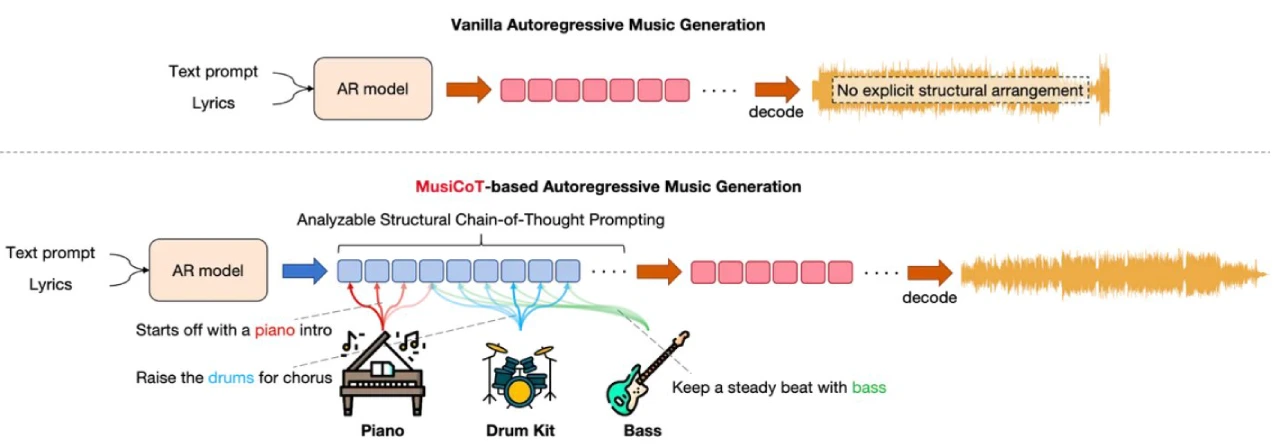
Chain of Thought (CoT) Technology: Simulates the human multi-step thinking process, breaking down complex music generation tasks into multiple steps for step-by-step reasoning. The model can think more deeply and self-optimize during music generation, improving the quality and coherence of the music.
Multi-turn Reasoning: The model first performs an initial creation, then continuously reviews and optimizes the previous creation results in subsequent rounds, ultimately producing high-quality music works.
Structured Generation: Unlike traditional autoregressive models that generate audio step by step, Mureka O1 pre-generates the overall music structure before fine-grained audio token prediction, significantly improving the structural coherence of generated music and the precision of instrumental arrangement.
Based on the CLAP Model: It does not require manual annotation, offers high scalability, and improves the interpretability and quality of generated music.
Reinforcement Learning Optimization: Optimizes model performance through continuous verification and error correction, such as self-optimization based on predefined reward functions (e.g., music quality, style consistency, etc.).
Policy Optimizer: Includes techniques such as gradient compression, exploration and exploitation, improving the model's training efficiency and generation quality.
Diverse Data Sources: Training data includes synthetic data, human expert annotation data, and Chain-of-Thought datasets (CoT Dataset), providing rich learning materials for the model.
Mureka O1 Features
Multilingual Support: Supports lyric creation and instrumental music generation in 10 languages (English, Chinese, Japanese, Korean, French, Spanish, Portuguese, German, Italian, and Russian).
Multiple Styles and Emotional Expressions: Covers a variety of musical styles such as jazz, electronic, pop, country, R&B, soul, blues, rock, dance, as well as emotions including happy, indulgent, mysterious, energetic, and sad.
Song Reference Function: Users can upload audio or YouTube links as creative prompts.
Voice Cloning Function: Users can select from a variety of official singer voices, or upload their own voice to let the AI learn and replicate it, generating personalized exclusive works.
Low-latency Music Generation: Achieves industry-leading low-latency music generation, providing an instant and high-quality user experience.
Open API Services and Model Fine-tuning: Provides music audio generation API and speech synthesis API, supports multiple inputs, and also opens fine-tuning services based on Mureka V6.
Performance
Surpassing Suno V4: In subjective and objective evaluations, Mureka O1 is significantly better than Suno V4 in terms of vocal, background music, and mixing texture, with notable improvements in instrumentation richness, compositional structure, and melodic quality.
Faster Generation Speed: Generates complete songs twice as fast as Suno V4, bringing users a more efficient creative experience.
Mureka O1 Tutorial
Visit the Official Website: Open the Mureka official website.
Register an Account: Register and log in with a Google email account.
Select Creation Mode:
Simple Mode: Enter a song description within 300 characters, for example, "A song full of sincere emotion, expressing deep longing for a friend," and click "Create."
Advanced Mode: Provides richer creative options, such as uploading reference songs, selecting singer voices, inputting lyrics, and choosing music style and mood.
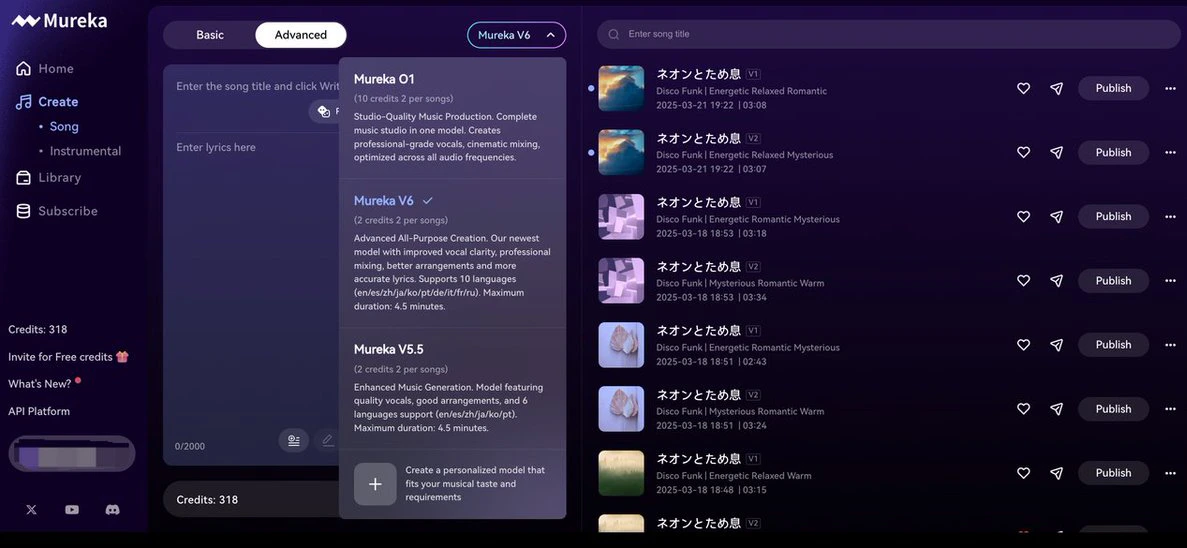
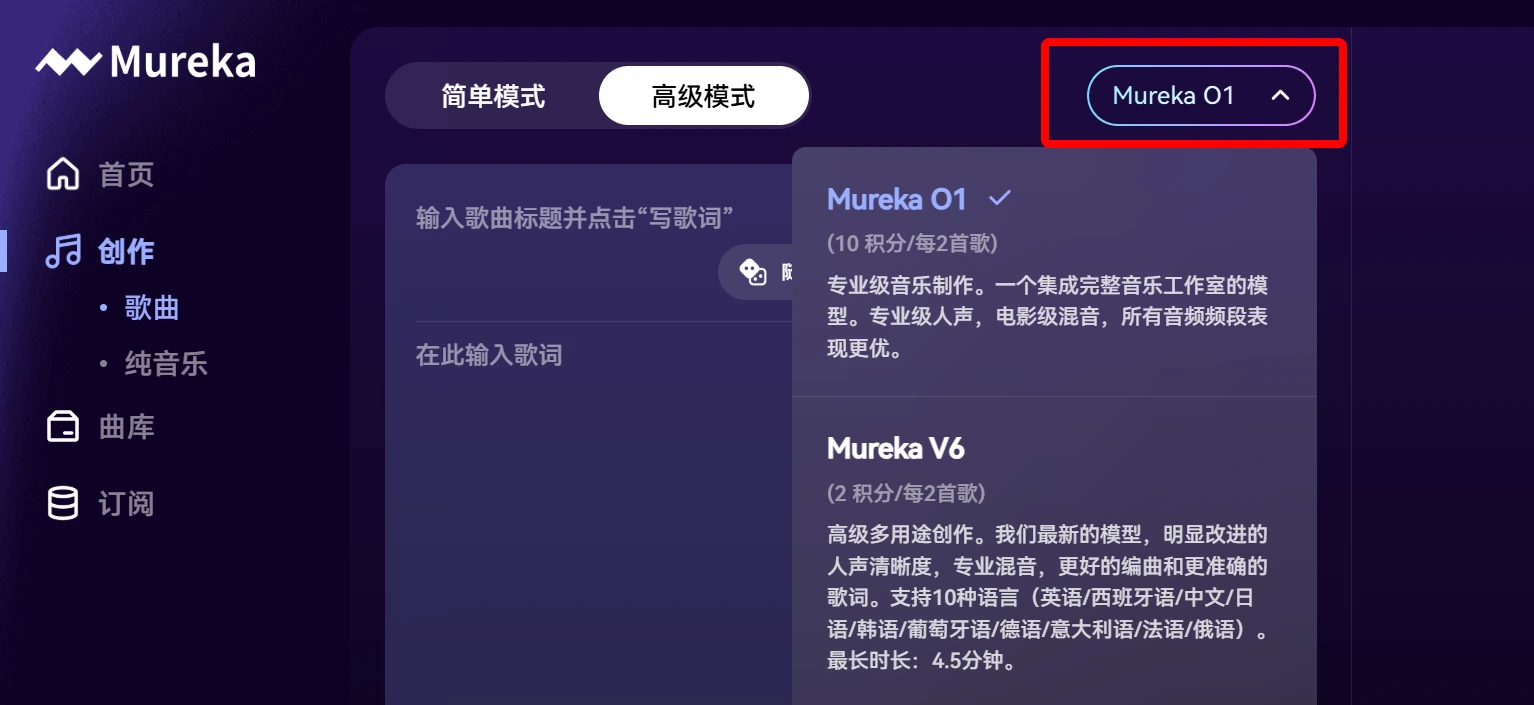
Select Model: Click to select Mureka O1 or Mureka V6, etc.
Generate Music: Click "Create" and wait for the music to be generated.
Export: Once generated, you can play, download, share, or further edit the music.
Mureka O1 Application Scenarios
Music Creation: Assist in creating melodies and lyrics, inspire creativity.
Music Production: Generate soundtracks for film, advertising, and games.
Music Education: Serve as a teaching tool to generate practice accompaniment.
Music Entertainment: Generate personalized playlists and provide interactive experiences.
Advertising & Marketing: Generate exclusive music for ads and brands.
Game Development: Generate dynamic music in real time based on game scenes.
Film & TV Production: Generate soundtracks and interludes for film and TV works.
Corporate Events: Generate music for events and brand promotions.
Official Website:https://www.mureka.ai/









