
 Script Planner Assistant▸
 AI Apps
 AI News
Tutorial: How to Create an AI Agent with Tencent Yuanqi
小编 ·

Tutorial: How to Create an AI Agent with Tencent Yuanqi
Let's take building a simple weather query assistant as an example to learn a tutorial on how to use Tencent Yuanqi to create a weather query ai intelligent agent step by step.
I. Preparation
Register and log in to Tencent Yuanqi: Visit the Tencent Yuanqi official website and log in with a Tencent account. If you don't have an account, you need to register first.
Clarify the goal: Confirm that this intelligent agent's function is to help users query weather information, including current weather, weather forecasts for the next few days, etc.
II. Creating an Intelligent Agent
1. Enter the Intelligent Agent Creation Page
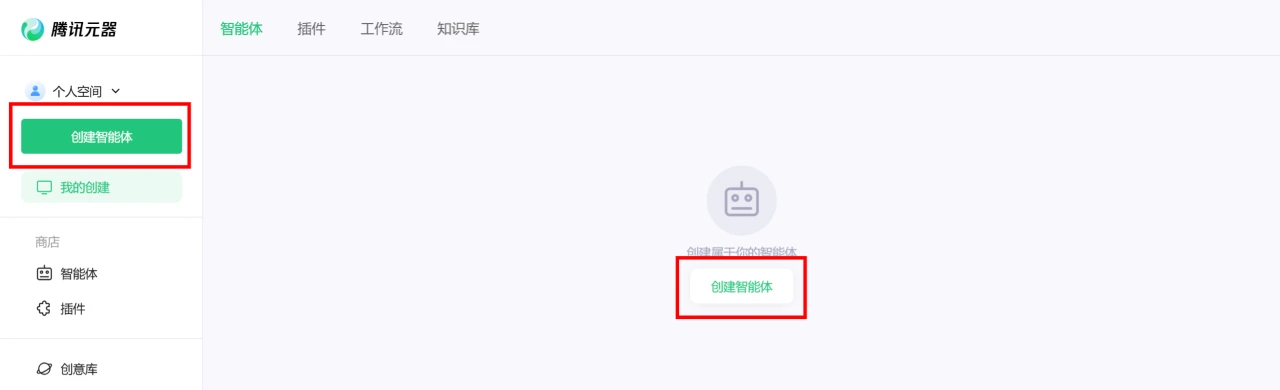
After logging into the Tencent Yuanqi platform, click the [Create Intelligent Agent] button to enter the creation page.
2. Select a Creation Mode
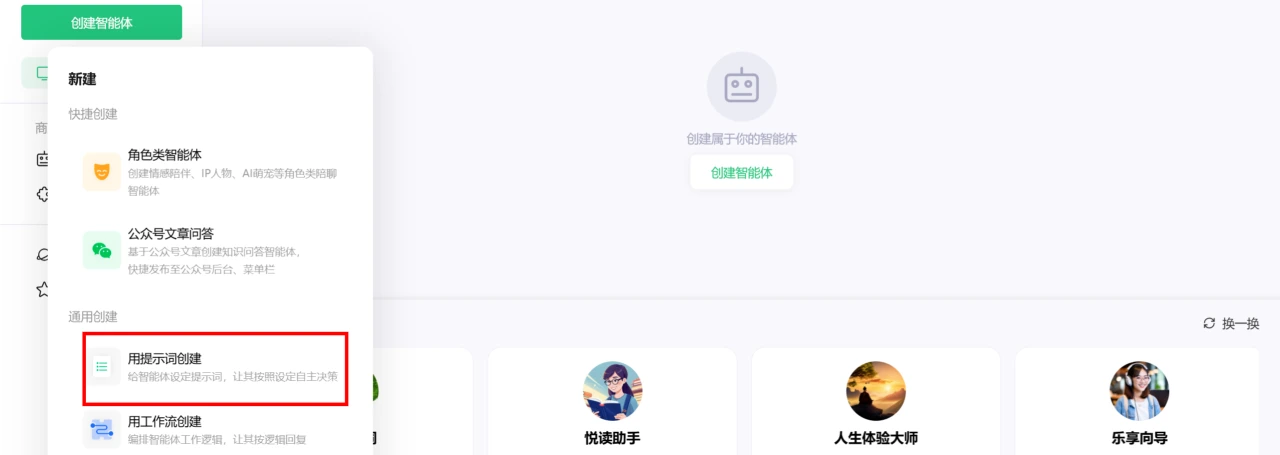
Select the "Create with prompts" mode, because it is simple and quick, suitable for beginners.
3. Configure Basic Information for the Intelligent Agent
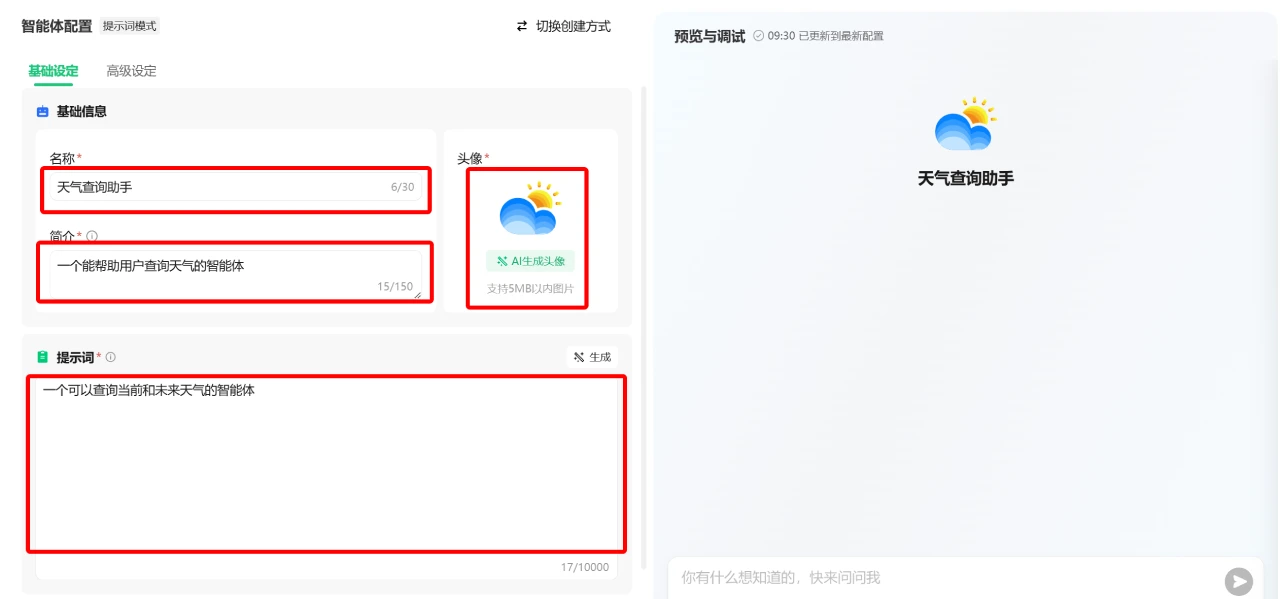
[Name] Enter "Weather Query Assistant".
[Introduction] Enter "An intelligent agent that can query current and future weather".
[Avatar] Select an avatar related to weather, such as a sun or cloud icon. You can find one in the iConFont icon library.
[Prompt] Enter in the input box: "An intelligent agent that can help users query the weather". It's even better to click [Generate] on the right.
[Conversation Opening] Enter in the input box: "Hello! I am the Weather Query Assistant. I can help you query the current weather and weather conditions for the next few days.".
III. Selecting a Model Base
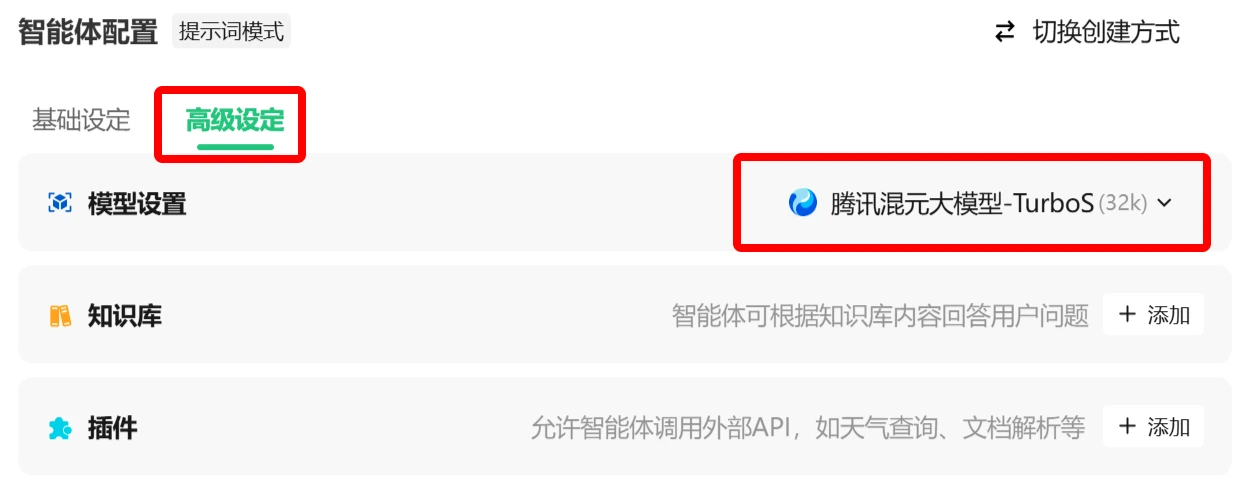
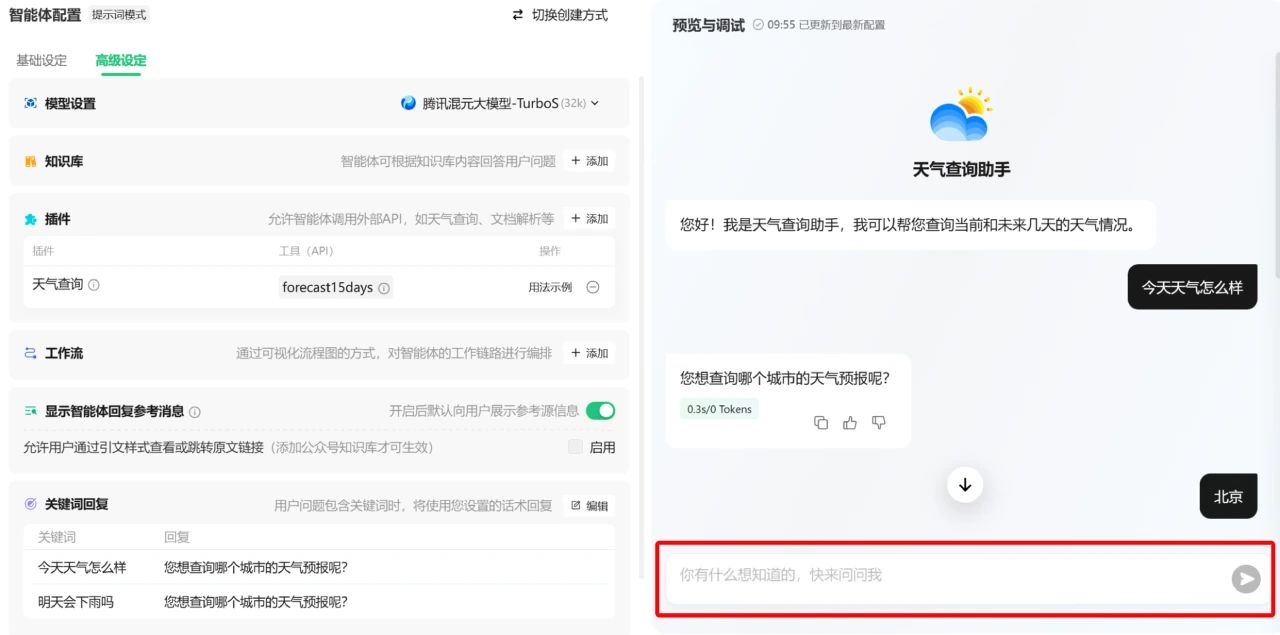
[Advanced Settings] - [Model Settings], select the Tencent Hunyuan model. Because the Hunyuan model performs well in natural language understanding, it can better understand various ways users query about the weather.
IV. Configuring Intelligent Agent Features
1. Add Plugins
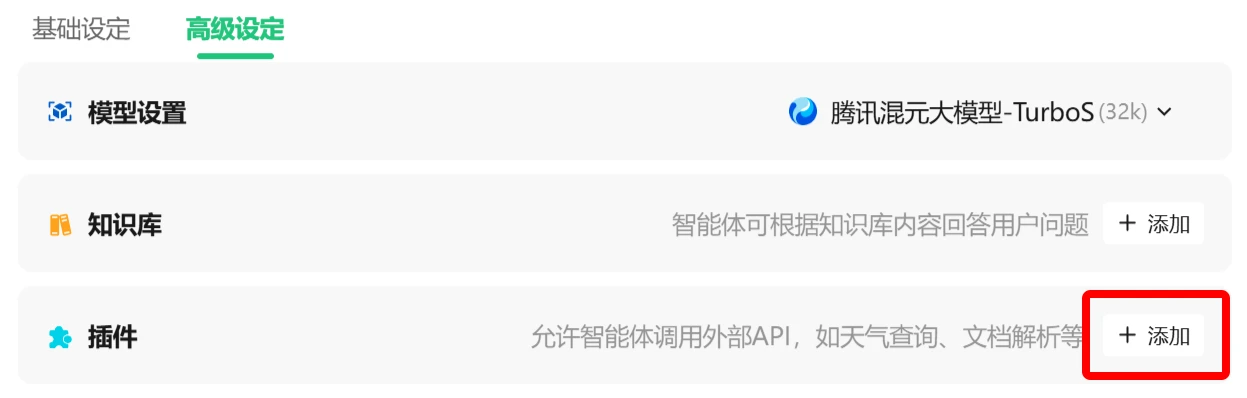
In the plugin marketplace, find the "Weather Query" plugin and add it. This plugin typically provides real-time weather query functionality and supports queries for multiple cities and regions.
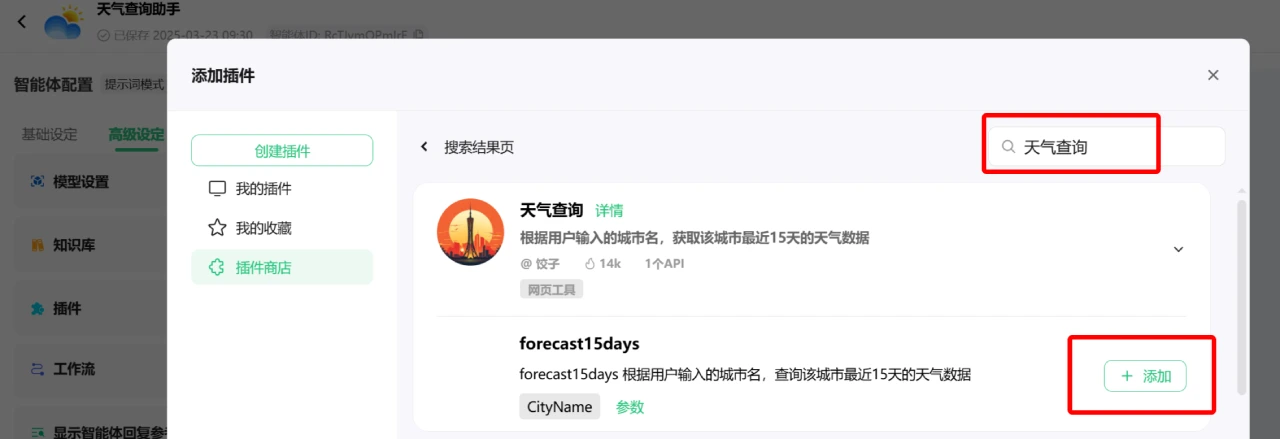
Configure the plugin parameters, such as setting the default query city to the user's location (if location functionality is supported), or allowing users to manually enter a city name.
2. Add Keyword Replies
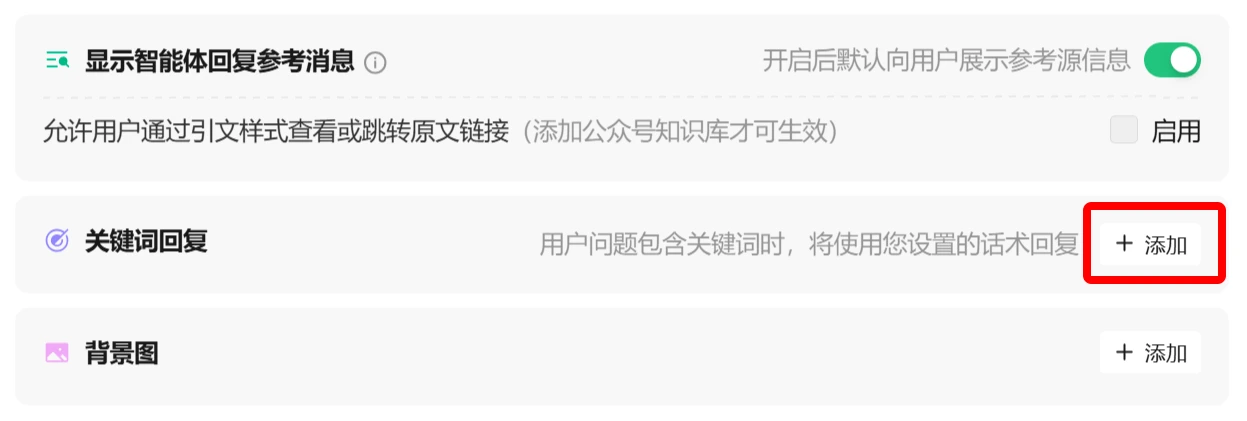
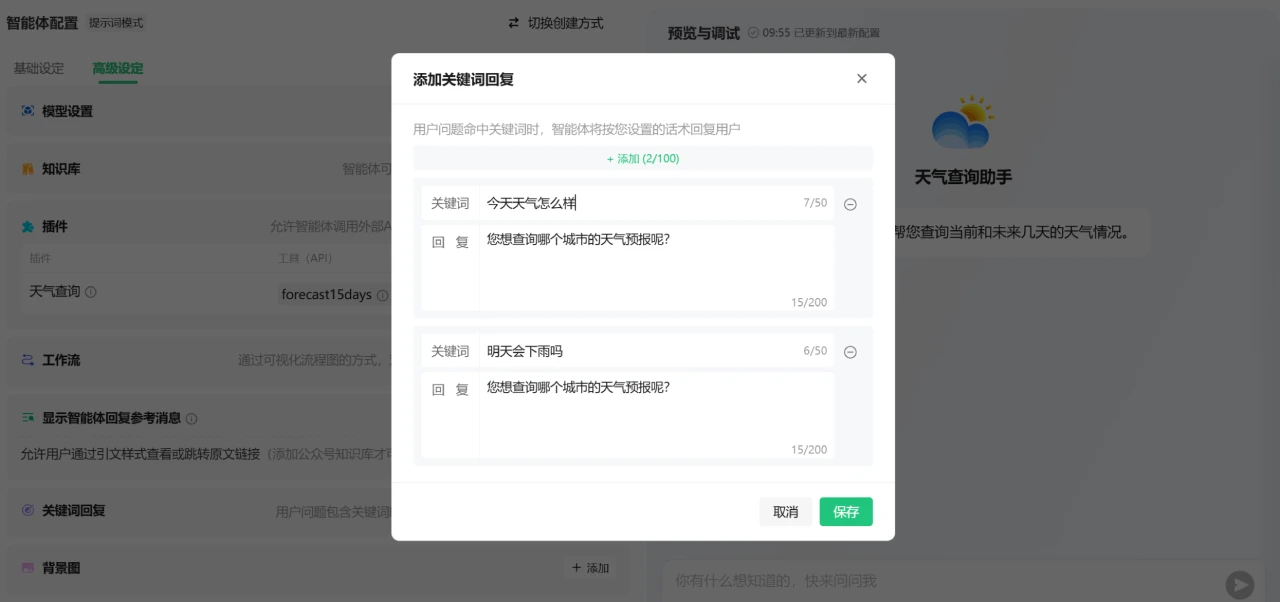
Configure Answers to Frequently Asked Questions:
User asks: "What's the weather like today?"
Intelligent agent answers: "Which city would you like to query the weather for?" (If the user has not specified a city)
After the user enters the city name, the intelligent agent calls the weather query plugin and returns the current weather conditions.
User asks: "Will it rain tomorrow?"
Intelligent agent answers: "Which city would you like to query the weather forecast for?" (If the user has not specified a city)
After the user enters the city name, the intelligent agent calls the plugin and returns tomorrow's weather forecast.
Set a fallback answer: For questions that cannot be understood, set a fallback answer, such as: "Sorry, I didn't understand your question. You can ask me questions about the weather!"
V. Testing the Intelligent Agent
In the Tencent Yuanqi query box, have a conversation with the intelligent agent to test whether its answers are accurate.
Test case 1: Enter "What's the weather like today?"
Expected result: The intelligent agent will ask you which city.
Test case 2: Enter "Beijing"
Expected result: The intelligent agent returns Beijing's current weather conditions, including temperature, weather conditions (sunny, rainy, etc.), wind force, and other information.
If you find that the intelligent agent's answers are inaccurate or have logical issues, return to the configuration page to make adjustments. For example, modify the answer template in the conversation logic, or adjust the plugin parameters.
VI. Publishing the Intelligent Agent
Click the green [Publish] button in the upper right corner to enter the publishing page
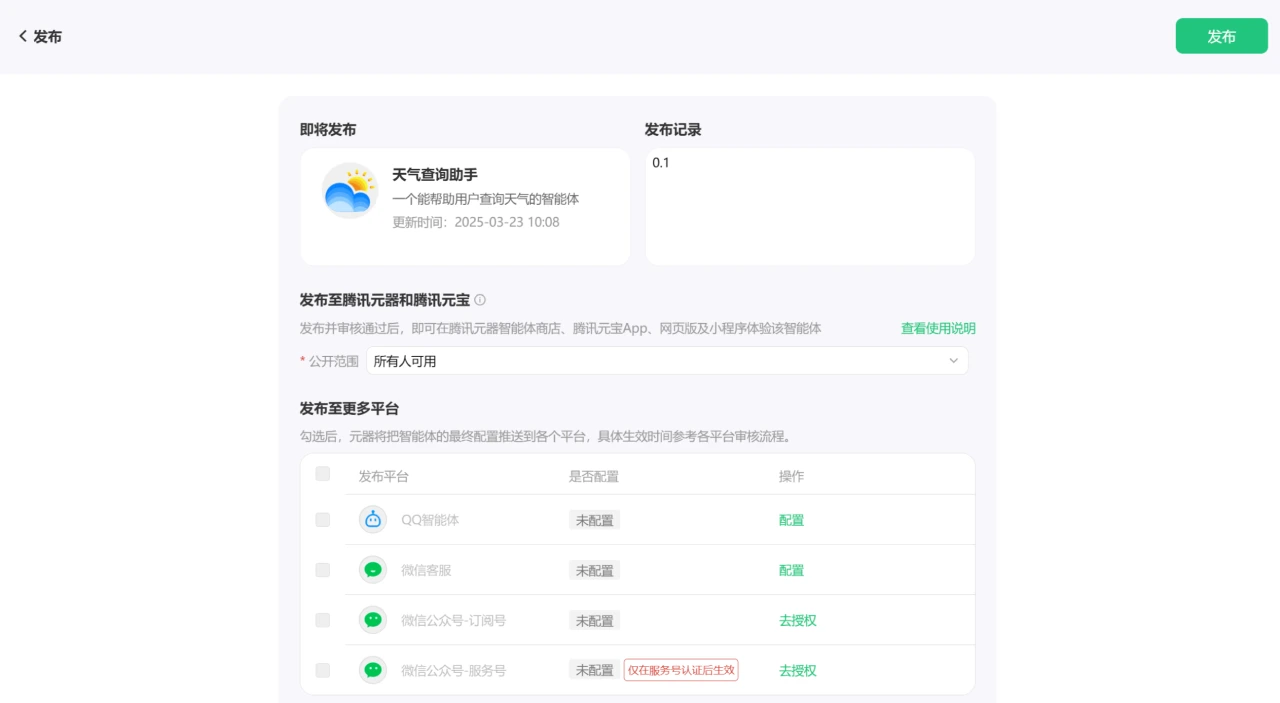
Public scope: Select available to everyone, so that all users who follow the WeChat official account can use this intelligent agent.
Select to publish the intelligent agent to the WeChat official account. Follow the platform prompts, bind the WeChat official account, and set the display position of the intelligent agent in the official account, for example, add a "Weather Query" button in the menu bar. Since my official account has expired, I cannot write down this integration process.
VII. Monitoring and Optimization
Monitor usage: After the intelligent agent is published, you can monitor the usage of the intelligent agent through Tencent Yuanqi's data dashboard, including indicators such as user conversation volume and user satisfaction.
Optimize based on feedback: If you find that users often query the weather for a certain city but the intelligent agent's answers are inaccurate, you can update the weather query plugin's data source; if users report that the conversation is not natural enough, you can optimize the keyword reply logic to make the answers closer to everyday spoken language and more scenarios.
Through the above tutorial, a simple "Weather Query Intelligent Agent" has been created. You can promote it so that users can query weather information through the WeChat official account with this AI intelligent agent. Additionally, you can learn some more advanced methods to make this intelligent agent more complete.









