
 Script Planner Assistant▸
 AI Apps
 AI News
Step-Video-TI2V: An Open-Source AI Text-to-Video and Image-to-Video Model by StepFun
小编 ·

Step-Video-TI2V: An Open-Source AI Text-to-Video and Image-to-Video Model by StepFun
What is Step-Video-TI2V
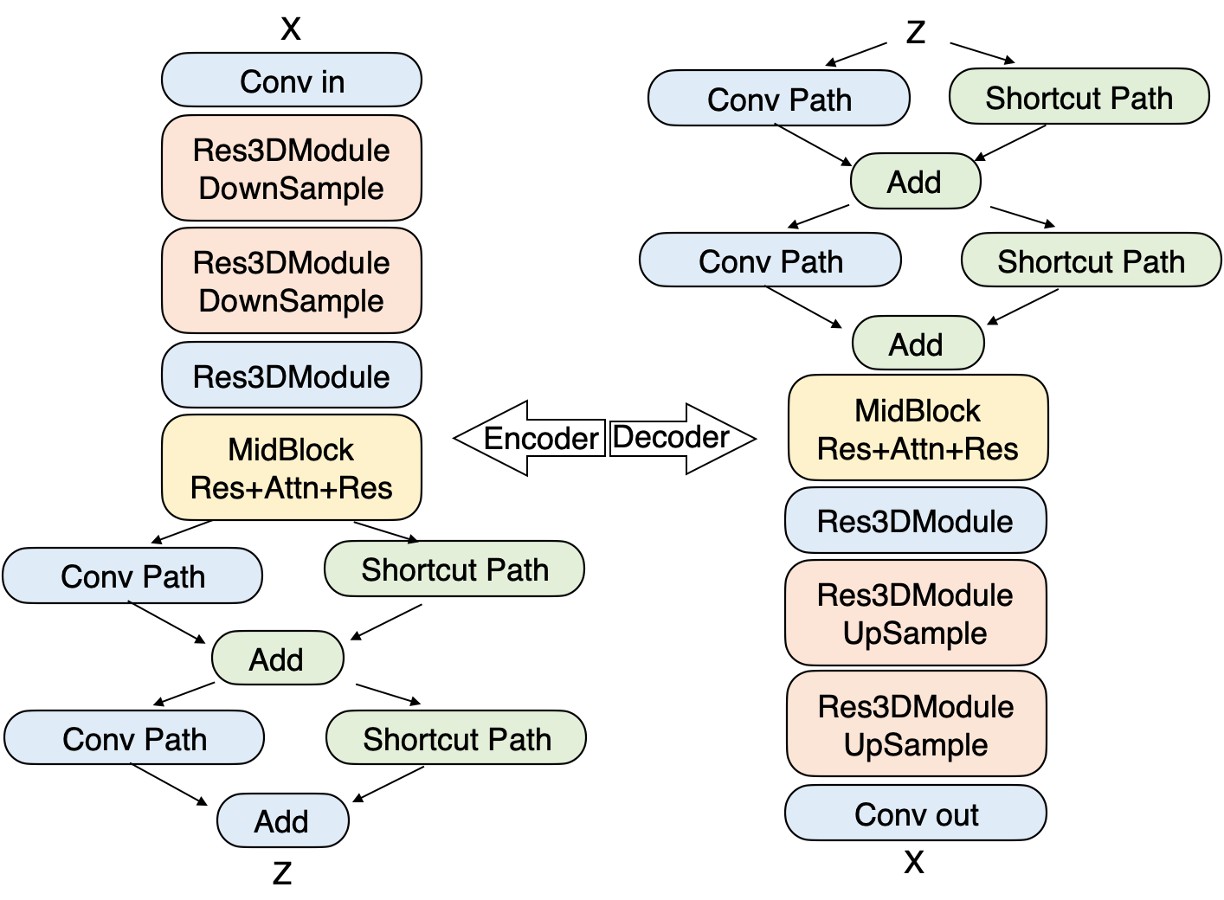
Step-Video-TI2V is an open-source text-driven AI image-to-video model released by the Stepfun team. It can generate high-quality videos based on user-provided text prompts and images. It performs exceptionally well in anime-style video generation, and supports motion control, multilingual input, and multiple video format outputs.
Step-Video-TI2V Features
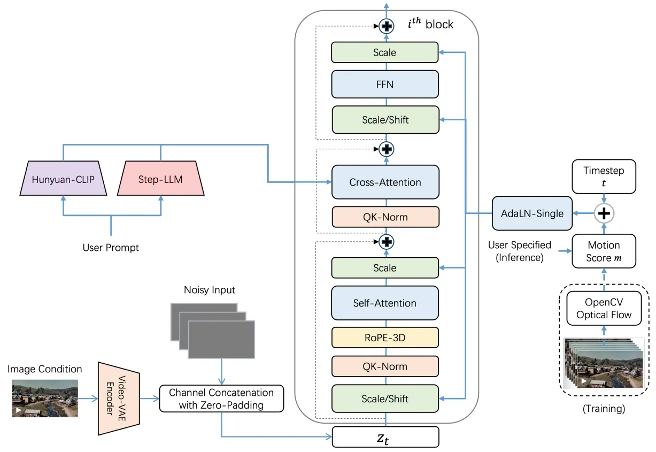
Text-driven image-to-video: Generates videos that are highly consistent with the text and image content based on the user-provided text prompts and input images.
Motion control: Users can specify different motion levels to precisely control the dynamic amplitude of the video, balancing dynamic effects and stability.
High-quality video output: Capable of generating 102-frame, 5-second videos at 540P resolution, supporting multiple video aspect ratios (landscape, portrait, and square).
Multilingual support: Supports both Chinese and English input, making it convenient for users with different language backgrounds.
Instruction following and content consistency: Performs excellently in instruction following, subject and background consistency, and adherence to physical laws, producing video content that meets user expectations.
Benchmark support: Developed the Step-Video-TI2V-eval benchmark dataset, which includes 178 real-world prompt-image pairs and 120 anime-style prompt-image pairs for evaluating model performance.
Step-Video-TI2V Applications
Content creation: Provides inspiration and material for video creators, enabling rapid video content generation and saving time and effort.
Anime production: Excels at anime-style video generation and can be used for anime character action demonstrations, scene animation, and more.
Advertising and marketing: Generates engaging video advertisements that showcase the features and advantages of products or services.
Education and training: Creates educational videos to help students better understand and remember knowledge.
Entertainment and social media: Provides users with a fun video generation experience that can be shared on social media to increase interaction and engagement.
Step-Video-TI2V Installation and Usage
Installation
1. Environment requirements: Python 3.8 or above is required, along with CUDA 11.3 or above (for GPU acceleration).
2. Install dependencies: Install the required Python packages using the following command:
pip install -r requirements.txt
3. Download the model: Download the model files from Hugging Face or Modelscope, and place them in the specified directory.
Usage
1. Prepare input data: Prepare an input image and a text prompt, ensuring that the text prompt is relevant to the content of the input image.
2. Run the code: Use the following command to run the model and generate a video:
python generate_video.py --image_path --text_prompt "" --output_path
3. Adjust parameters: Adjust motion control parameters (such as motion amplitude) and other generation parameters as needed to achieve the desired video effect.
Related Links
GitHub repository: https://github.com/stepfun-ai/Step-Video-TI2V
Hugging Face model page: https://huggingface.co/stepfun-ai/stepvideo-t2v
Modelscope model page: https://modelscope.cn/models/stepfun-ai/stepvideo-ti2v
Github-ComfyUI: https://github.com/stepfun-ai/ComfyUI-StepVideo
Paper: https://arxiv.org/abs/2503.08334









