
 Script Planner Assistant▸
 AI Apps
 AI News
YT-Navigator: An AI-Powered Smart Search Tool for YouTube Content
小编 ·

YT-Navigator: An AI-Powered Smart Search Tool for YouTube Content
What is YT-Navigator?
YT-Navigator is an AI-powered YouTube content discovery tool. It uses natural language processing and semantic search technology to help users quickly extract information from a large number of YouTube videos without having to watch them manually. YT-Navigator is ideal for researchers, students, content creators, and any users who need to quickly retrieve information from YouTube channels.
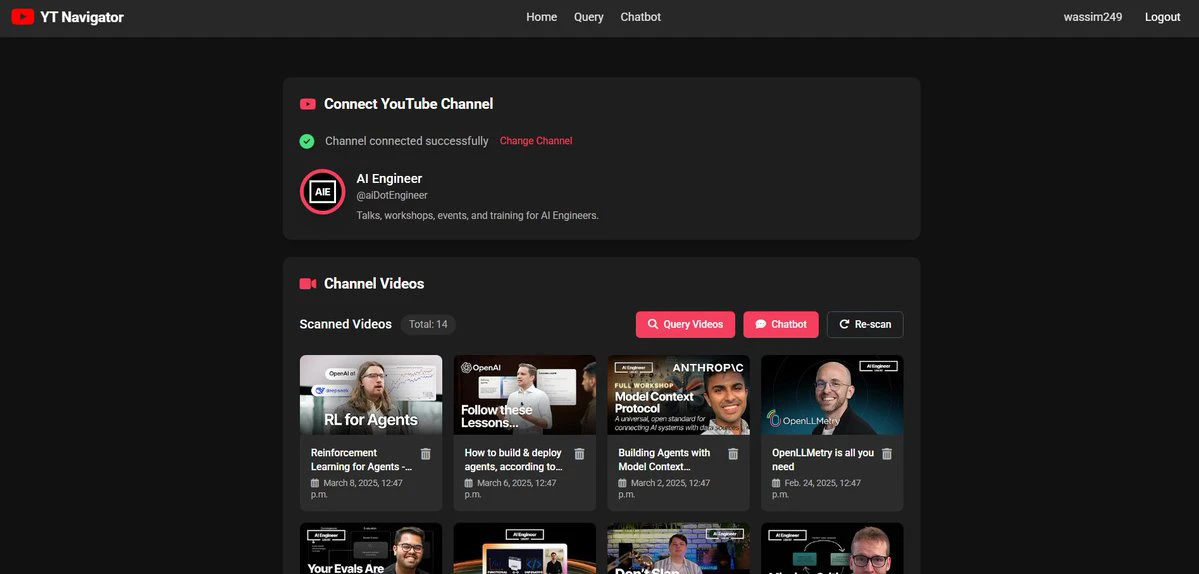
YT-Navigator Core Features:
1. Channel Management
Users can connect to a channel by entering the YouTube channel's URL.
The system automatically extracts the channel's title, description, and avatar information, and stores them in the database.
Users can choose the number of videos to scan in the channel (up to 100), and the system will process the video metadata and transcripts in parallel.
2. Semantic Search
Users can search across the channel's videos using natural language queries.
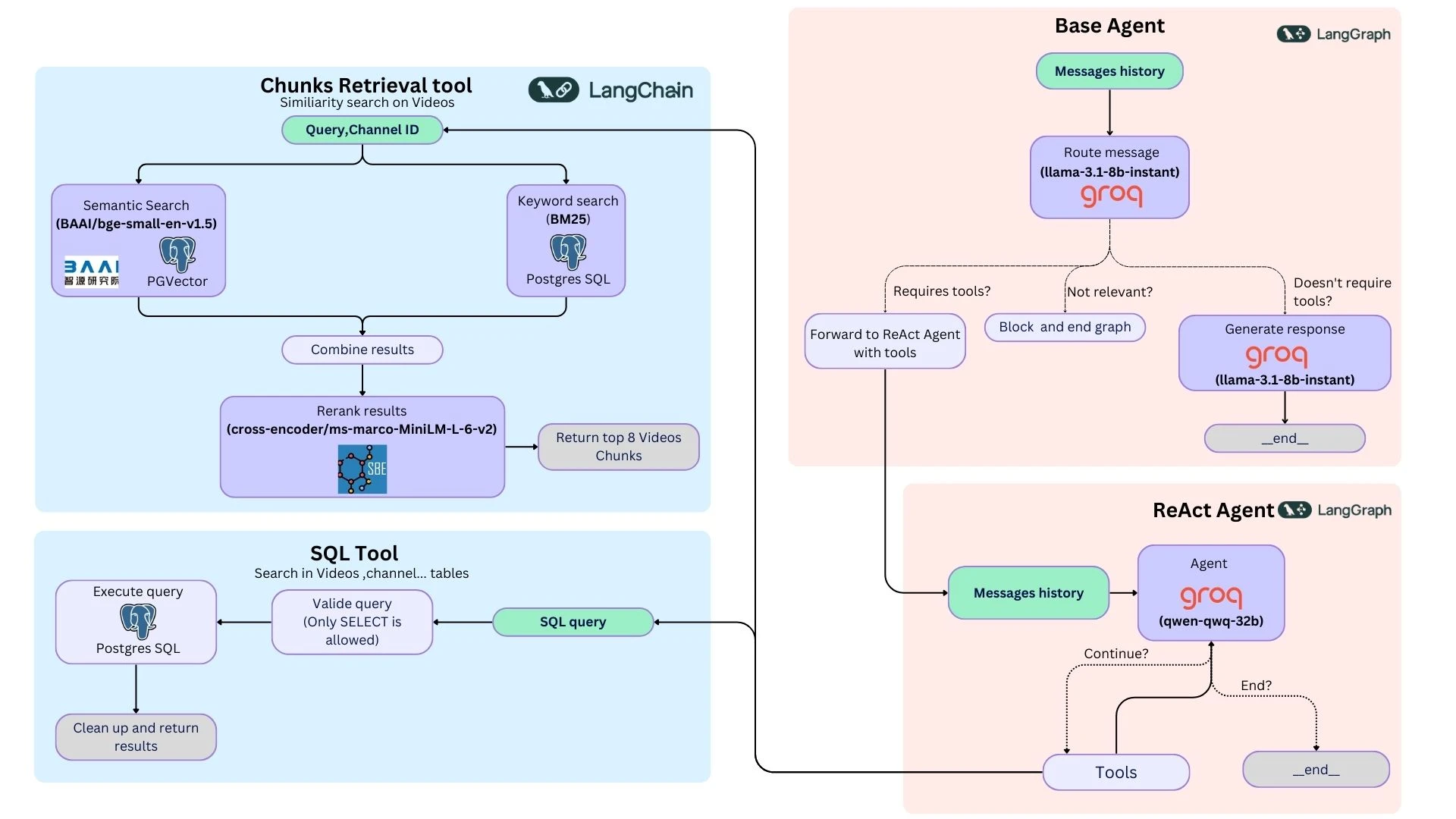
The system combines semantic search (based on vector embeddings) and keyword search (using BM25) to provide comprehensive search results.
Search results are re-ranked by relevance and return the most relevant video segments, along with precise timestamps to help users jump directly to the relevant content in the video.
3. Chat Feature
Users can have an interactive conversation with the channel's content.
The AI provides answers based on the video transcripts, supporting direct answers, static answers, or tool-assisted answers (by querying the vector database to retrieve information).
This feature leverages the ReAct framework to ensure answer accuracy and relevance.
4. Secure Authentication
Provides a secure login mechanism and independent session management to ensure the safety of user data.
YT-Navigator Use Cases
1. Research and Learning
Researchers can quickly find video content on specific topics, saving time.
Students can use the tool to find learning materials, such as course explanations, academic lectures, and more.
2. Content Creation
Content creators can quickly get inspiration and find relevant ideas and materials.
It can be used for video editing to quickly locate the segments needed.
3. Information Retrieval
Users can quickly find answers to specific questions without watching the entire video.
Suitable for scenarios where information needs to be retrieved quickly, such as news reporting and technical tutorials.
YT-Navigator Installation
1. Clone the repository:
git clone https://github.com/wassim249/YT-Navigator
2. Create a virtual environment and install dependencies:
python -m venv venv
source venv/bin/activate
pip install -e .
3. Ensure that a PostgreSQL database is running.
4. Create a .env file in the root directory (copy from the .env.example file).
5. Create Django database migrations and run migrations:
python manage.py makemigrations
python manage.py migrate
6. Start the development or production server:
make dev  # development environment
make prod  # production environment
How to Use YT-Navigator
Register and Log In: After opening the application, create an account and log in.
Connect a YouTube Channel: Enter the YouTube channel's URL on the homepage, and the system will automatically fetch the channel information.
Scan Videos: Choose the number of videos to scan (up to 100). Once the scan is complete, the channel content becomes available for searching and chatting.
Search for Information: Use the search feature to enter a natural language query, and the system will return relevant video segments, transcripts, and precise timestamps.
Chat Feature: Enter questions in the chat interface, and the AI will provide answers based on the channel content.
GitHub Repository:https://github.com/wassim249/YT-Navigator









