
 Script Planner Assistant▸
 AI Apps
 AI News
Chitu: A High-Performance LLM Inference Framework Open-Sourced by Tsinghua University
小编 ·

Chitu: A High-Performance LLM Inference Framework Open-Sourced by Tsinghua University
What is Chitu (赤兔)?
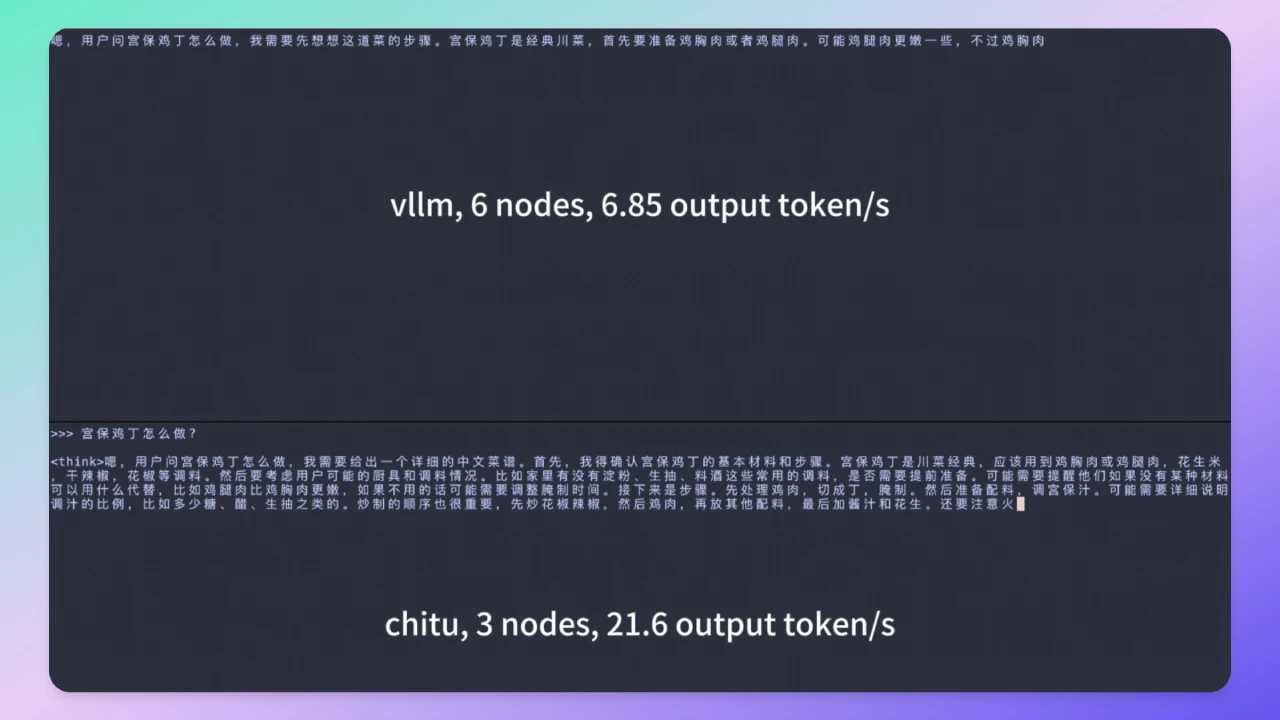
Chitu (赤兔) is a high-performance large language model inference framework open-sourced by a team from Tsinghua University. It focuses on improving inference efficiency, reducing costs, and supporting multiple hardware platforms and deployment scenarios. It can halve the inference cost of DeepSeek while doubling performance. The goal of Chitu (赤兔) is to provide enterprises and developers with an efficient, flexible, and easy-to-deploy inference engine, accelerating the real-world adoption of large language models (LLMs).
Features of Chitu (赤兔)
Diverse Compute Adaptation: Supports a wide range of NVIDIA products, from the latest flagship models to older generations, and provides optimized support for domestic chips.
Full-Scenario Scalability: Offers flexible, scalable solutions ranging from pure CPU deployment and single-GPU deployment to large-scale cluster deployment.
Long-Term Stable Operation: Suitable for production environments, capable of stably handling concurrent business traffic.
Efficient Inference Performance: In A800 cluster tests, compared with some foreign open-source frameworks, it achieved a 3.15x increase in inference speed while reducing GPU usage by 50%.
Cost Reduction: Optimizes hardware resource usage, lowering the barriers and costs for enterprises to deploy ai models.
Application Scenarios of Chitu (赤兔)
Enterprise-Grade AI Applications: Scenarios requiring high-performance, low-latency, and high-throughput inference services.
Large-Scale Cluster Deployment: Scenarios requiring efficient operation in multi-GPU or multi-node environments.
Resource-Constrained Environments: Scenarios requiring efficient inference under limited hardware resources.
Domestic Chip Adaptation: Scenarios requiring large language models to run on domestic hardware platforms.
How to Use Chitu (赤兔)
1. Install from Source
git clone --recursive https://github.com/thu-pacman/chitu && cd chitu
pip install -r requirements-build.txt
pip install -U torch --index-url https://download.pytorch.org/whl/cu124  # 根据 CUDA 版本调整
TORCH_CUDA_ARCH_LIST=8.6 CHITU_SETUP_JOBS=4 MAX_JOBS=4 pip install --no-build-isolation
2. Single-GPU Inference
torchrun --nproc_per_node 8 test/single_req_test.py request.max_new_tokens=64 models=DeepSeek-R1 models.ckpt_dir=/data/DeepSeek-R1 infer.pp_size=1 infer.tp_size=8
3. Hybrid Parallelism (TP+PP)
torchrun --nnodes 2 --nproc_per_node 8 test/single_req_test.py request.max_new_tokens=64 infer.pp_size=2 infer.tp_size=8 models=DeepSeek-R1 models.ckpt_dir=/data/DeepSeek-R1
4. Launch Service
export WORLD_SIZE=8
torchrun --nnodes 1 \
--nproc_per_node 8 \
--master_port=22525 \
example/serve.py \
serve.port=21002 \
infer.stop_with_eos=False \
infer.cache_type=paged \
infer.pp_size=1 \
infer.tp_size=8 \
models=DeepSeek-R1 \
models.ckpt_dir=/data/DeepSeek-R1 \
keep_dtype_in_checkpoint=True \
infer.mla_absorb=absorb-without-precomp \
infer.soft_fp8=True \
infer.do_load=True \
infer.max_reqs=1 \
scheduler.prefill_first.num_tasks=100 \
infer.max_seq_len=4096 \
request.max_new_tokens=100 \
infer.use_cuda_graph=True
5. Performance Test
python benchmarks/benchmark_serving.py \
--model "deepseek-r1" \
--iterations 10 \
--seq-len 10 \
--warmup 3 \
--base-url http://localhost:21002
GitHub Repository:https://github.com/thu-pacman/chitu









