
 Script Planner Assistant▸
 AI Apps
 AI News
VideoPainter: An Open-Source Arbitrary-Length Video Inpainting and Editing Tool Supporting Text-Prompted Video Editing
小编 ·

VideoPainter: An Open-Source Arbitrary-Length Video Inpainting and Editing Tool Supporting Text-Prompted Video Editing
What is VideoPainter
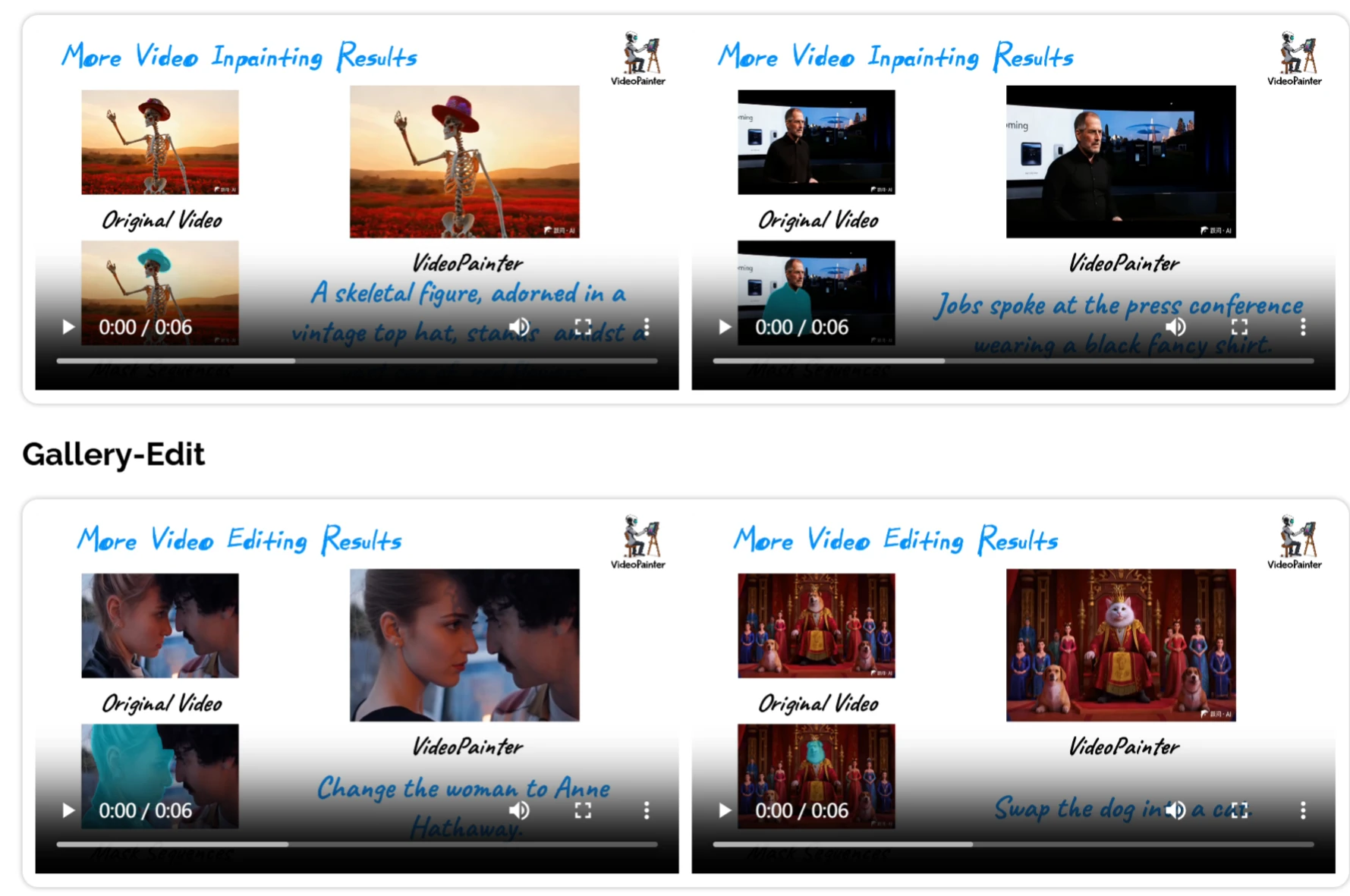
VideoPainter is an open-source video inpainting and editing framework jointly launched by the Chinese University of Hong Kong, Tencent ARC Lab, the University of Tokyo, and the University of Macau, capable of handling videos of arbitrary length. Through its innovative dual-branch architecture, lightweight context encoder, and pretrained diffusion model, it can efficiently process inpainting tasks on videos of any length, supports video editing via text instructions—by inputting prompts, it automatically identifies the video content that needs modification and completes the edit, supports long videos, and is compatible with DiT models.
Core Features of VideoPainter
Arbitrary-length video inpainting: Handles videos of various durations and repairs occluded or damaged portions.
Background preservation and foreground generation: With the dual-branch architecture, it accurately preserves backgrounds while generating high-quality foregrounds.
Text-guided video editing: Adds or removes content from videos through text instructions.
Object consistency maintenance: Maintains consistent object identity in long videos, avoiding drift or abrupt changes.
Plug-in style control: Can be combined with different diffusion models or LoRA to meet diverse editing needs.
Technical Principles of VideoPainter
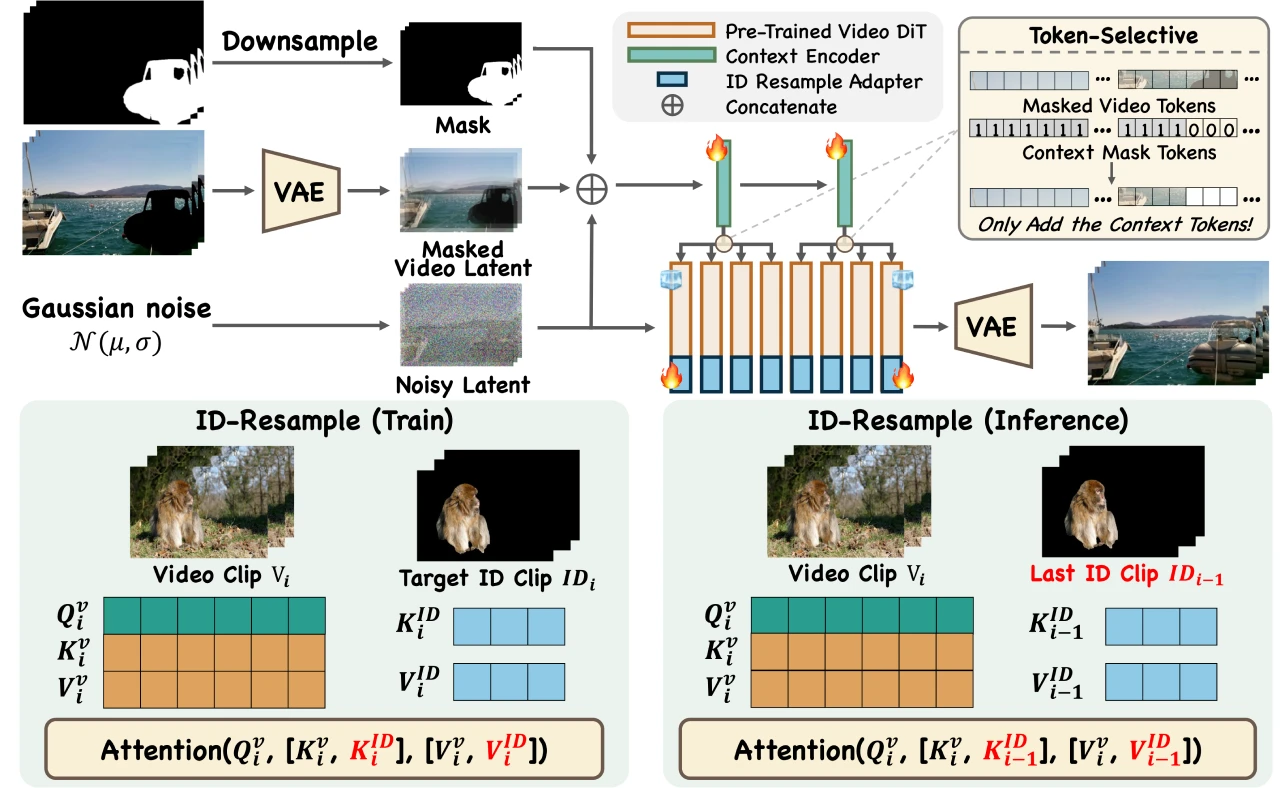
Dual-branch architecture: Splits video inpainting into background processing and foreground generation to improve efficiency and avoid information confusion.
Target region ID resampling: During inference, features of masked regions from the previous video segment are concatenated into the current segment to maintain object consistency in long videos.
Plug-in style control: Supports various stylized backbones or LoRA, compatible with T2V and I2V diffusion models, making it easy for users to choose the base model.
Types of Video Damage VideoPainter Can Repair
Occluded regions in the frame.
Frame issues caused by encoding errors or corruption.
Object drift issues in long videos.
Background and foreground imbalance issues.
Repair and editing based on text instructions.
Application Scenarios of VideoPainter
Film and TV restoration production: Restoring damaged frames in old movies and TV series.
Advertising and marketing: Quickly generating videos, adding or replacing backgrounds and props.
Video creation and live streaming: Real-time repair of video errors or interference.
VR and AR applications: Generating immersive videos, repairing or modifying virtual scenes.
Education and training: Producing instructional videos and restoring images of ancient documents.
How to Use VideoPainter
Download and install: Visit the VideoPainter GitHub project page, download the source code archive, and extract it.
Environment configuration: Ensure your computer meets the system requirements and install the required Python packages (typically by running pip install -r requirements.txt).
Run the program: Open a terminal or command prompt, navigate to the extracted project directory, and run python main.py — command-line arguments may be required.
Using the interface: Launch the Gradio interface for video inpainting and editing; if it is not available, interact via the command line.
Advanced features: Learn and leverage advanced features such as the dual-branch architecture, target region ID resampling, and plug-in style control to optimize results.
Save and export: Once processing is complete, save and export the repaired video, choosing an appropriate format and quality settings.
Related Links
Project website: https://yxbian23.github.io/project/video-painter/
GitHub repository: https://github.com/TencentARC/VideoPainter
HuggingFace model library: https://huggingface.co/TencentARC/VideoPainter
arXiv technical paper: https://arxiv.org/pdf/2503.05639









