
 Script Planner Assistant▸
 AI Apps
 AI News
OpenManus-RL: An Open-Source Project for Enhancing LLM Agent Reasoning and Decision-Making
小编 ·

OpenManus-RL: An Open-Source Project for Enhancing LLM Agent Reasoning and Decision-Making
What is OpenManus-RL?
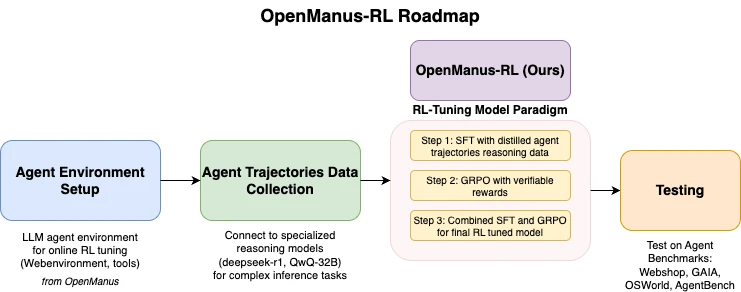
OpenManus-RL is an open-source project jointly developed by UIUC-Ulab and the OpenManus team from the MetaGPT community. It enhances the reasoning and decision-making capabilities of large language model (LLM) agents through Reinforcement Learning (RL) techniques. Built on the experience of advanced models such as Deepseek-R1 and QwQ-32B, the project explores new tuning methods to improve agent performance in complex tasks. The core features of OpenManus-RL include agent environment setup, trajectory data collection, reinforcement learning tuning support, and benchmark integration. It also incorporates multiple RL strategies, such as Tree-of-Thoughts and Monte Carlo Tree Search, to enhance the agent's reasoning capabilities.
OpenManus-RL Features
Agent Environment Setup: Provides agent environment configuration tools for online reinforcement learning (RL) tuning, making it easy for users to customize agent environments for specific tasks.
Trajectory Data Collection: Capable of connecting to models such as Deepseek-R1 and QwQ-32B to collect behavioral data from complex tasks, providing data support for subsequent tuning.
RL Tuning Support: Supports reinforcement learning methods for customizing agent behavior, allowing users to optimize agent behavior by specifying reward functions and other approaches.
Benchmark Integration: Built-in testing environments such as WebShop, GaA, OSWorld, and AgentBench, allowing users to quantitatively evaluate agent performance.
Diverse Strategies: Integrates reinforcement learning strategies such as Tree-of-Thoughts and Monte Carlo Tree Search to enhance the agent's reasoning capabilities in long-horizon planning tasks.
Community Collaboration: Allows users to submit code, datasets, etc. Significant contributors may become co-authors of papers, fostering collaborative community development.
Real-time Progress Sharing: Dynamically updates and displays the RL tuning process and results, keeping users informed of the project's latest progress.
OpenManus-RL Application Scenarios
Shopping Decision-Making: Customize agent environments to optimize agent performance in shopping decision tasks, such as improving purchase success rates in WebShop.
Complex Task Analysis: Analyze agent performance in complex tasks, such as success rates and response time metrics in benchmarks like GAIA and OSWorld, helping developers compare model performance.
Multimodal Task Optimization: In multimodal task environments like OSWorld, optimize agent behavior to improve performance in multimodal tasks.
Long-Horizon Planning Tasks: Leverage integrated diverse strategies to enhance the agent's reasoning capabilities in long-horizon planning tasks, for example by optimizing agent behavior through the Tree-of-Thoughts strategy.
OpenManus-RLInstallation
1. Create a Conda Environment: To avoid dependency conflicts, it is recommended to use Conda to create an environment with the following commands:
conda create -n openmanus-rl python=3.10
conda activate openmanus-rl
2. Clone the Project: Ensure Git is installed, then clone the project and enter the project directory with the following commands:
git clone https://github.com/OpenManus/OpenManus-RL.git
cd OpenManus-RL
3. Install Dependencies: Run the following commands in the project root directory to install dependencies. If downloads are slow, you can use a domestic mirror:
pip install -r requirements.txt
or
pip install -r requirements.txt -i https://pypi.tuna.tsinghua.edu.cn/simple
Visualization tools require additional installation:
pip install matplotlib numpy
4. Configure Models and Datasets:
Supervised Fine-Tuning (SFT): Specify the model and dataset with the following command:
python -m openmanus_rl.sft --model_name_or_path Qwen/Qwen2.5-1.5B-Instruct --dataset_name CharlieDreemur/OpenManus-RL
Reinforcement Learning Tuning (GRPO): Configure the reward function with the following command:
python -m openmanus_rl.grpo --model_name_or_path Qwen/Qwen2.5-1.5B-Instruct --dataset_name CharlieDreemur/OpenManus-RL-GRPO --reward_funcs accuracy format tag_count
Datasets can be obtained from Huggingface.
5. Run the Project:
Run SFT on a Single GPU:
python -m openmanus_rl.sft --output_dir data/sft-output
Run GRPO on Multiple GPUs (requires zero3.yaml configuration):
accelerate launch --config_file=configs/accelerate_configs/zero3.yaml openmanus_rl/grpo.py --output_dir data/grpo-output
Using OpenManus-RL
1. Agent Environment Setup:
Run python -m openmanus_rl.sft to generate the base environment.
Modify configuration files (such as task objectives or reward functions).
Execute python -m openmanus_rl.grpo to start tuning.
2. Data Collection and Testing:
Configure the model (e.g., Deepseek-R1): python -m openmanus_rl.grpo --model_name_or_path Deepseek-R1
Run the test: --benchmark GAIA, with results saved to the data/ directory.
3. RL Tuning Operations:
Run GRPO mode: python -m openmanus_rl.grpo --reward_funcs accuracy
Check the training logs; the model will be saved to data/grpo-output.
GitHub Repository Address:https://github.com/OpenManus/OpenManus-RL









