
 Script Planner Assistant▸
 AI Apps
 AI News
MeshPad: A Sketch-Driven 3D Mesh Generation and Editing Tool
小编 ·

MeshPad: A Sketch-Driven 3D Mesh Generation and Editing Tool
What is MeshPad?
MeshPad is a highly practical interactive tool that quickly transforms simple 2D sketches into high-quality 3D mesh models and supports real-time editing. It divides editing operations into two parts—deleting mesh regions and adding new mesh geometry—to enable coherent editing. Users can trigger these operations through simple edits to the sketch, allowing them to progressively create content and build complex 3D meshes. For designers, artists, and engineers, it offers an efficient and intuitive way to bring their ideas to life.
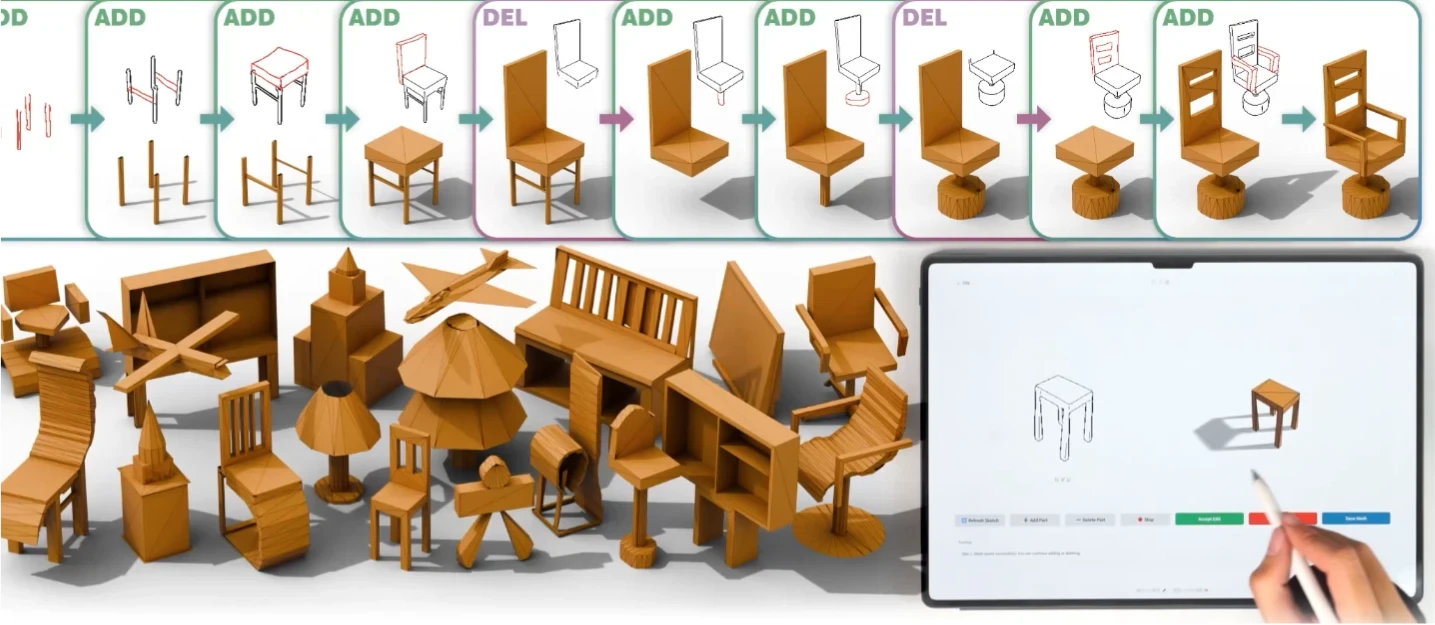
MeshPad Features
Sketch-driven mesh generation: Users draw 2D sketches, and MeshPad automatically generates the corresponding 3D mesh models.
Interactive editing: Users can modify the 3D mesh in real time by adding or removing lines on the sketch, including deleting regions or adding new geometry.
Efficient performance: MeshPad employs an optimized inference strategy, requiring only a few seconds per edit, and the generated mesh quality achieves a 22% improvement over existing methods in Chamfer distance.
MeshPad Technical Implementation
Triangle sequence representation: Efficiently handles mesh addition and deletion operations.
Transformer model: Captures complex geometric relationships and generates high-quality meshes.
Speculative prediction strategy: Significantly reduces computational cost and accelerates the editing process by predicting multiple output tokens for vertices.
MeshPad Application Scenarios
Art and design: Quickly convert sketches into 3D models for sculpture, animation, or game design.
Architectural design: Transform hand-drawn sketches into architectural models and adjust design details in real time.
Industrial design: Rapidly generate and modify product prototypes to accelerate design iteration.
How to Use MeshPad
Sketch input: The user draws a 2D sketch.
Mesh generation: MeshPad automatically generates an initial 3D mesh model.
Interactive editing: Trigger mesh modifications through sketch edits.
Export model: Export the generated 3D model in common formats for downstream use.
MeshPad official website:https://derkleineli.github.io/meshpad/
MeshPad paper:https://arxiv.org/abs/2503.01425









