
 Script Planner Assistant▸
 AI Apps
 AI News
Mahilo: An AI Multi-Agent Human Collaboration Framework for Emergency Response, Customer Service, and Teamwork
小编 ·

Mahilo: An AI Multi-Agent Human Collaboration Framework for Emergency Response, Customer Service, and Teamwork
What is Mahilo?
Mahilo is a flexible multi-agent system framework that supports real-time API and voice interactions. It allows custom agents and integration of agents from other frameworks, supports collaborative work under human supervision, shares contextual information, and improves efficiency in handling complex tasks. It is well-suited for scenarios that require multiple agents to collaborate, such as emergency response, customer service, and team collaboration.
Architecture and Components
AgentManager: Manages agent registration and communication.
BaseAgent: The base agent class, supporting communication and context sharing with other agents.
ServerManager: Manages WebSocket connections, supporting real-time multi-user interaction.
Session: Manages each agent's conversation session, supporting persistent storage.
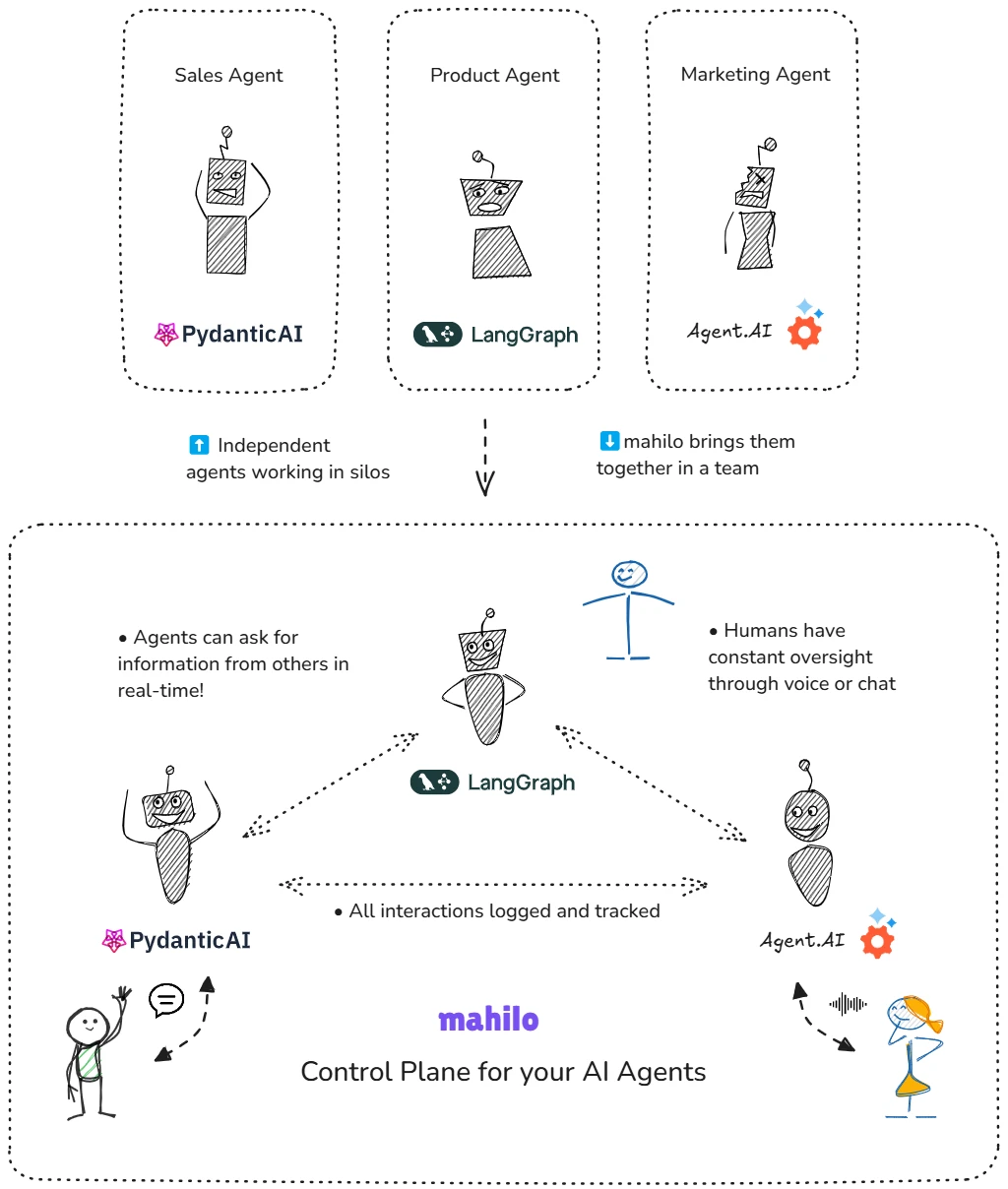
Mahilo Core Features
Real-time API Support: Supports voice-based interaction with agents.
Easily Extensible BaseAgent Class: Developers can create their own agents based on BaseAgent.
WebSocket Real-time Communication: Supports multiple users interacting with agents in real time simultaneously.
Flexible Communication Modes: Supports Peer-to-Peer and Hierarchical communication modes.
Communication Control: Restricts inter-agent communication through a can_contact list.
Session Management: Supports persistent conversations for convenient multi-turn interaction.
CLI Client: Provides a command-line interface for easy testing and interaction.
Multi-user Support: Multiple users can connect to the same agent, suitable for multi-person collaboration in emergencies.
On-demand Agent Activation: Agents are only activated when needed, saving resources.
Mahilo Use Cases
Emergency Response Coordination: Multiple agents can coordinate actions, such as a medical advisor, logistics coordinator, and public communications lead jointly responding to a public health emergency.
Customer Service: Multiple customer service agents can handle customer issues simultaneously and share information when needed.
Team Collaboration: Agents can serve as assistants to team members, helping coordinate tasks and share information.
Mahilo Installation and Usage
1. Installation:
pip install mahilo[voice]
If you need voice functionality, you also need to install PyAudio.
2. Run the Server:
Run the following command in the project directory to start the server:
python run_server.py
The server runs by default at http://localhost:8000.
3. Connect to an Agent:
Use the CLI client to connect to an agent:
mahilo connect --agent-name your_agent_name
If you need voice functionality, you can add the --voice parameter.
GitHub Repository:https://github.com/wjayesh/mahilo
Official Website:https://mahilo.wjayesh.com/









