
 Script Planner Assistant▸
 AI Apps
 AI News
Probly: An AI-Powered Spreadsheet App Combined with Python Data Analysis
小编 ·

Probly: An AI-Powered Spreadsheet App Combined with Python Data Analysis
What is Probly?
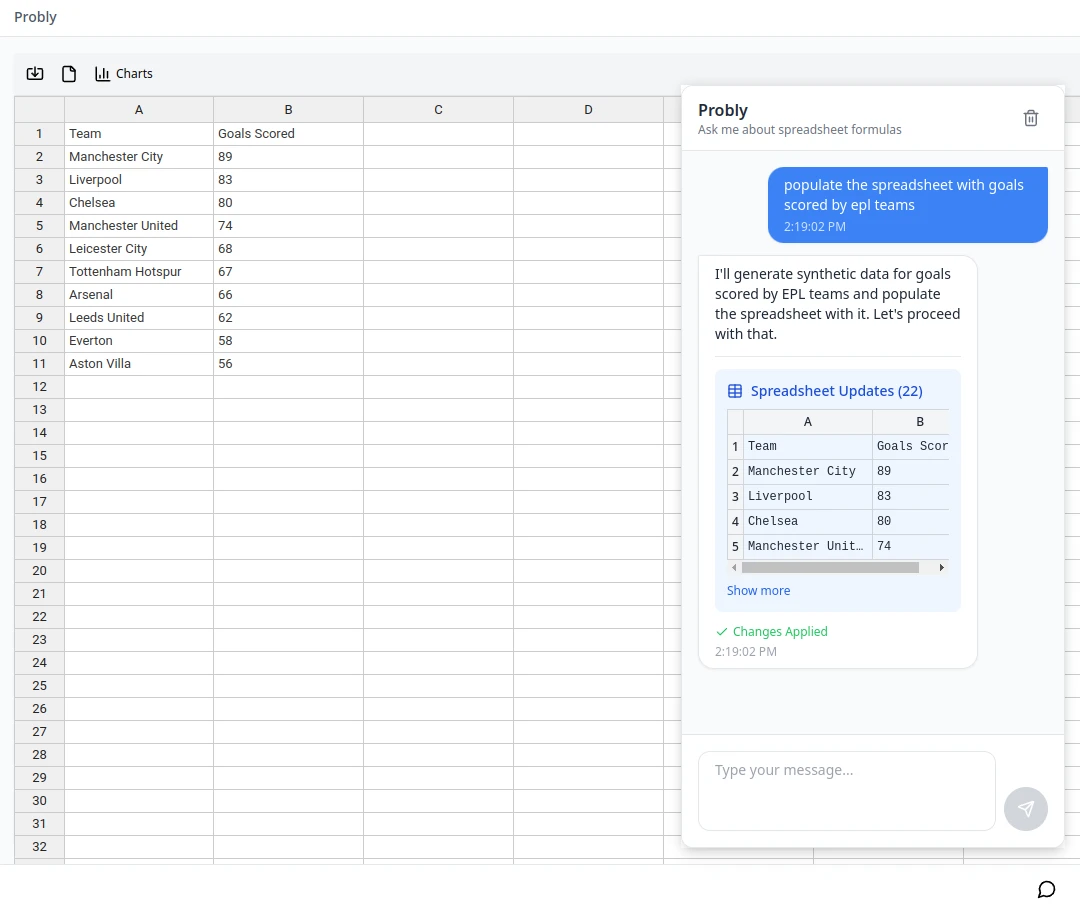
Probly is an AI-driven spreadsheet application that combines the functionality of spreadsheets with Python data analysis capabilities.
Main Features of Probly
Interactive Spreadsheet
Supports direct cell editing, formula input (starting with =), cell formatting, and copy-pasting.
Supports multiple formulas, including mathematical operations (e.g., SUM, AVERAGE), statistical functions (e.g., STDEV, MEDIAN), logical functions (e.g., IF, AND), lookup functions (e.g., VLOOKUP, HLOOKUP), and text functions (e.g., CONCATENATE, LEFT).
Data Import/Export
Supports importing Excel files (.xlsx format) and exporting spreadsheets to Excel format, while preserving formulas and formatting.
Integration with AI Features
Invoke the AI assistant via keyboard shortcuts (e.g., Ctrl+Shift+/) or by clicking the icon.
Ask questions in natural language to get data insights, formula suggestions, chart generation, and even run Python analyses.
Interface and Interaction
Provides a toolbar for quick access to common functions such as import, export, and chart management.
Supports standard spreadsheet keyboard shortcuts for convenient user operation.
Python Analysis
Run Python code directly in the browser with no additional dependencies required.
Uses WebAssembly technology so that Python code runs locally in the browser, ensuring data privacy.
Charts and Visualization
Supports generating charts and visualizations based on data
Tech Stack of Probly
Frontend framework: The application is built based on Next.js and runs smoothly on modern mainstream browsers.
Python runtime: Leverages Pyodide (Python compiled to WebAssembly) to enable Python code execution in the browser.
Visualization tool: Uses ECharts to achieve diverse data visualizations.
How to Use Probly?
Installation
You can install it from GitHub via pip:
pip install git+https://github.com/bencwallace/probly#egg=probly
Quick Start
Initialize random variables and perform operations:
>>> import probly as pr
>>> X = pr.Ber()  # Bernoulli random variable
>>> Y = pr.Ber(0.9)
>>> Z = pr.Unif(-10, 10)  # Uniformly distributed random variable
>>> W = (1 + X) * Z / (5 + Y)  # A new random variable
>>> W.mean()  # Compute the mean
AI Feature Invocation
Invoke the AI assistant via keyboard shortcuts (e.g., Ctrl+Shift+/) or by clicking the icon.
Python Code Execution
Run Python code directly in the browser with no additional dependencies required.
Data Import and Export
Supports importing Excel files (.xlsx format) and exporting to Excel
Use Cases for Probly
Daily data analysis: Whether for data processing tasks at work or personal data organization needs, you can efficiently perform analysis in the spreadsheet, handle complex calculations with Python code, and obtain useful information through intelligent assistance.
Education and learning field: Can serve as a teaching tool to help students learn data analysis, Python programming, and data visualization-related knowledge, deepening understanding through hands-on practice.
Daily office work: General users can use AI features to quickly gain data insights.
GitHub Repository:https://github.com/PragmaticMachineLearning/probly









