
 Script Planner Assistant▸
 AI Apps
 AI News
BiliBili ShadowReplay: A Tool for Clipping and Uploading Bilibili Live Streams
小编 ·

BiliBili ShadowReplay: A Tool for Clipping and Uploading Bilibili Live Streams
What is BiliBili ShadowReplay?
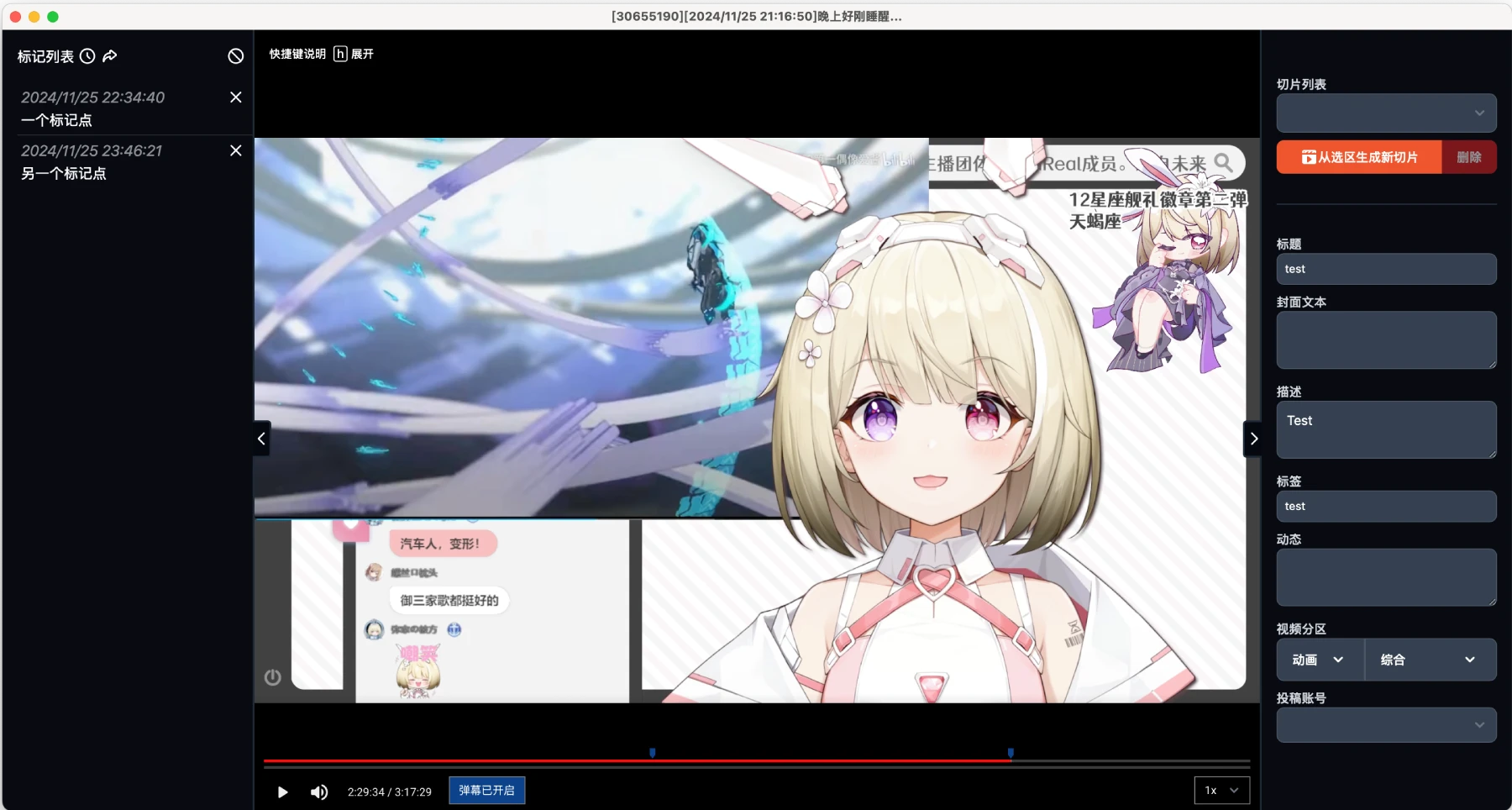
BiliBili ShadowReplay is a real-time clipping tool for bilibili live streams. It is specifically designed to cache B站 live broadcast content and perform real-time editing and submission. Using this tool is very convenient — you simply need to predefine the specific time interval in advance, then edit a few simple and necessary pieces of information, and you can easily complete the editing and production of live broadcast clips, and even submit them smoothly. The entire process is highly efficient, and from preparation to completion, the time can be compressed down to the minute level.
Additionally, the tool supports playback of previously cached historical B站 live broadcasts, and when performing clip editing and submission processing, it follows the same workflow as real-time live broadcasts, making it very convenient for users.

BiliBili ShadowReplay Features:
Capture live highlights: During gaming, talent, or educational live streams, streamers or viewers can instantly capture exciting moments such as extreme plays or funny incidents, eliminating the need to sift through lengthy recordings.
Enhanced interactive experience: The danmaku-triggered clipping function allows viewers to ask streamers to save interesting moments, participate in live broadcast production, and boost interaction and engagement.
Faster content sharing: After a live stream ends, streamers can quickly edit highlights and upload them to B站 to attract followers and traffic.
Efficient multi-room management: BiliShadowreplay can simultaneously cache video streams from multiple live rooms, making it easy for teams or individuals to centrally manage them and quickly produce highlight compilations across multiple rooms.
Creation of educational and training materials: During educational live streams, instructors can clip key points to create short teaching videos.
Convenient event live broadcast review: For live broadcasts such as esports tournaments, it can quickly produce highlights to meet viewers' review needs and provide promotional materials for organizers.
A treasure trove of materials for content creators: Content creators can use it to accumulate materials, making it easy to find high-quality live content quickly when producing edited videos or daily shares.
Simplified live broadcast data analysis: It automatically caches and analyzes live broadcast clips, allowing streamers and teams to easily obtain data, understand audience preferences, and optimize live content.
BiliBili ShadowReplay Use Cases:
Video Creators
Content optimization: Edit live broadcast content, remove irrelevant parts, produce highlight clips for submission, and improve work quality.
Material preservation: Cache live broadcasts as creative materials for easy review, summarization, and inspiration mining.
Audience Applications
Highlights review: Replay missed live broadcast content and reinforce learning of knowledge.
Secondary creation: Edit streamers' highlight moments and add creativity to produce fan-oriented videos.
Commercial Applications
Brand promotion: Produce marketing videos to expand brand exposure.
Data analysis: Analyze live broadcast audience behavior to provide a basis for market research and product optimization.
How to Use BiliBili ShadowReplay:
1. Enable caching: Before starting a live broadcast, make sure the relevant parameters have been configured in BiliBili ShadowReplay, such as the cache path and cache duration. Once the live broadcast starts, the tool will automatically cache the live broadcast content according to the settings.
2. Define the time interval: After the live broadcast ends, open the ShadowReplay software. Find the corresponding cached live broadcast record in the software interface, and accurately define the time interval of the clip you want to edit using the timeline or by entering specific time values.
3. Edit required information: Edit the basic information for the live broadcast clip, including title, description, and tags. The title should be concise, clear, and attractive; the description should accurately summarize the core content of the clip; and the tags should be popular keywords related to the live broadcast content so that more users can find it through search.
4. Complete clipping and submission: After confirming that the time interval and edited information are correct, click the "Clip" button on the software interface, and the tool will automatically edit the live broadcast content within the selected interval. Once the clip is completed, click the "Submit" button, fill in the relevant submission information as prompted, such as the submission category, to complete the submission. The entire process can be compressed to the minute level.
GitHub:https://github.com/Xinrea/bili-shadowreplay









