
 Script Planner Assistant▸
 AI Apps
 AI News
VideoGrain: An AI Video Editing Tool for Fine-Grained Adjustments
小编 ·

VideoGrain: An AI Video Editing Tool for Fine-Grained Adjustments
What is VideoGrain?
VideoGrain is a video editing tool jointly developed by the University of Technology Sydney and Zhejiang University. It can perform video editing at different granularities, such as replacing objects within the same category, applying different edits to different instances in a video, and editing specific parts of an instance—for example, adding a hat or sunglasses to a person.
Core Technology of VideoGrain
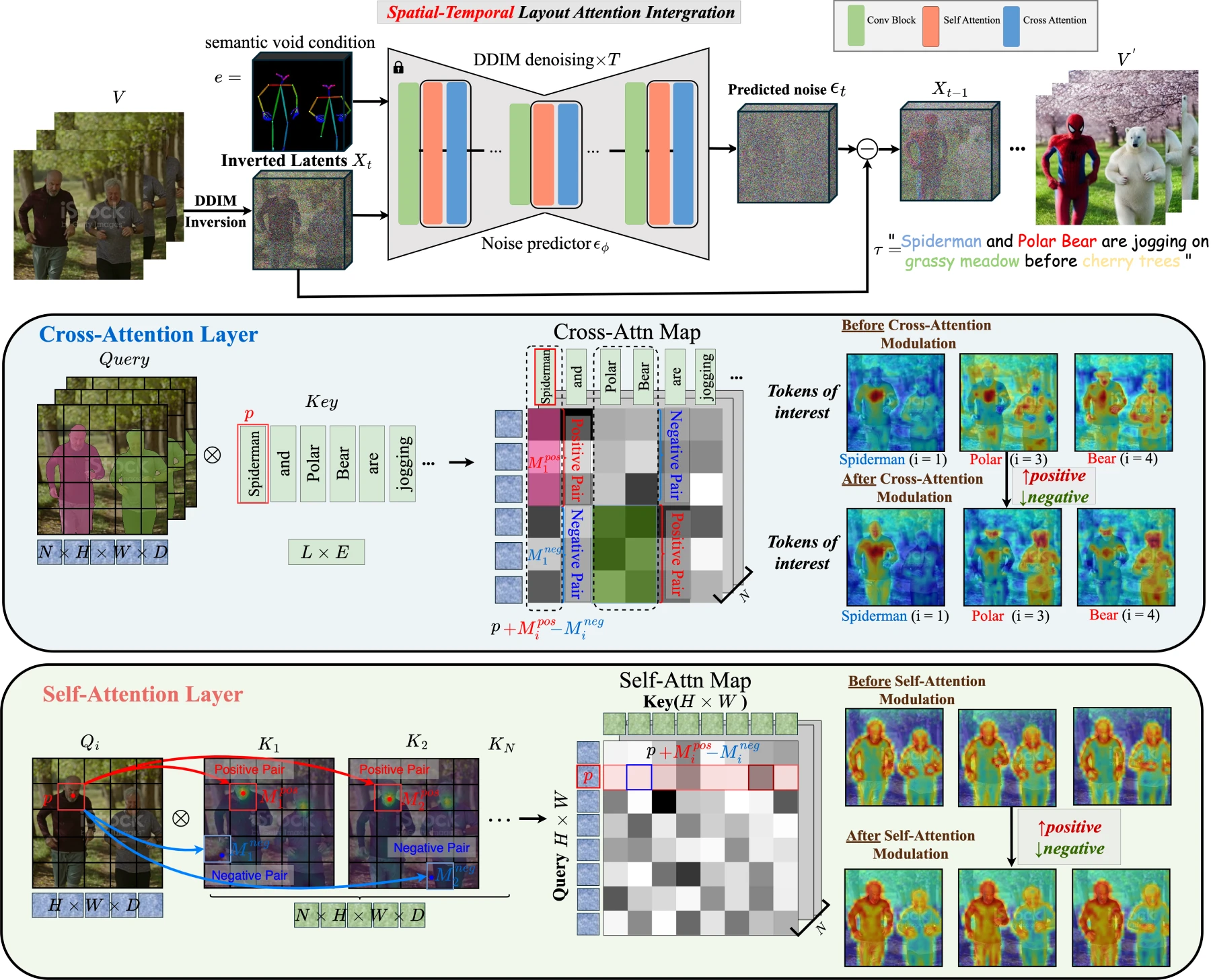
Spatiotemporal Attention Modulation Mechanism: By optimizing cross-attention and self-attention, it achieves fine-grained control over video content and improves editing accuracy and efficiency.
Zero-shot Editing: It does not require large amounts of training data and can achieve high-quality editing by relying on pre-trained models, broadening the scope of video editing.
Key Features and Functions of VideoGrain
Multi-granularity Editing: Leveraging the spatiotemporal attention modulation mechanism, VideoGrain enables multi-granularity control over video content. This allows users to perform detailed edits on videos, handling both overall scenes and specific details.
Zero-shot Editing Capability: This feature enables VideoGrain to perform edits even without direct examples. Users can modify or create videos based on descriptive text, greatly enhancing editing flexibility and creativity.
Efficient Text-to-Region Control: VideoGrain can accurately control specific regions or objects in a video according to text instructions, simplifying the complex positioning and selection processes in traditional video editing.
Feature Separation Capability: It can effectively handle different elements in a video, such as backgrounds, people, or objects, allowing these parts to be edited independently—crucial for adjusting complex video content.
Category-Level, Instance-Level, and Part-Level Editing: VideoGrain supports editing levels ranging from macro to micro. Users can edit entire categories (e.g., all vehicles), specific instances (e.g., a particular car in the video), or even parts of an object, providing a high level of editing precision.
Advantages of VideoGrain
Precise Control: With simple text prompts, it can precisely locate and edit target content, achieving an editing accuracy of over 90%.
High Efficiency: On an NVIDIA A40 GPU, editing a 16-frame video takes only 3.83 minutes, greatly improving creative efficiency.
Multi-granularity Support: From category-level and instance-level to part-level editing, VideoGrain handles all of them well, providing creators with a broader creative space.
Application Scenarios of VideoGrain
Content Creation and Entertainment:
Film and Television Production: With VideoGrain, production staff can quickly modify characters, scenes, or objects in videos.
Advertising and Marketing: Advertisers can use VideoGrain to rapidly generate a wide variety of advertising materials.
Social Media Content: Users can easily edit and beautify their video content through simple text prompts.
Education and Training:
Virtual Laboratories: In science education, teachers can use VideoGrain to create and edit instructional videos, dynamically demonstrating experimental processes and results.
Simulation Training: In simulation training for fields such as military and medical care, VideoGrain can be used to generate and modify training scenarios.
Design and Art:
Animation Production: Animators can use VideoGrain to quickly generate and modify animated characters and scenes.
Artistic Creation: Artists can use VideoGrain for video art creation.
News and Media:
News Editing: News editors can use VideoGrain to quickly edit and adjust news video content.
Documentary Production: Documentary makers can use VideoGrain to restore and enhance historical footage.
Medical and Healthcare:
Medical Image Analysis: Doctors and researchers can use VideoGrain to annotate and edit medical images.
Rehabilitation Training: Through VideoGrain, rehabilitation therapists can create personalized training videos to help patients conduct effective rehabilitation training.
How to Use VideoGrain?
Installation and Setup:
You need a computer with GPU support, as VideoGrain runs best on a GPU.
Obtain VideoGrain's open-source code repository from the official websites of the University of Technology Sydney or Zhejiang University, and download and install it.
Prepare Video Materials:
Collect the video materials you want to edit, and ensure the video format meets VideoGrain's requirements.
Text Prompts:
Write clear and concise text prompts based on the content you want to edit. For example: "Turn all red cars in the video into blue," or "Put sunglasses on the person in the video."
Run Editing Commands:
Open a terminal or command-line interface and navigate to the VideoGrain installation directory.
Use the provided command-line tool to run the editing command. For example:
python edit_video.py --video_path path_to_your_video.mp4 --text_prompt "把视频中所有红色汽车变成蓝色"
View Editing Results:
Once editing is complete, VideoGrain will generate a new video file, usually saved in the specified output directory.
Open the generated video file to check whether the editing effect meets your expectations.
Adjustment and Optimization:
If you are not satisfied with the editing results, you can try adjusting the text prompt or re-running the editing command until you achieve the desired effect.
GitHub: https://github.com/knightyxp/VideoGrain
Project Page: https://knightyxp.github.io/VideoGrain_project_page/









