
 Script Planner Assistant▸
 AI Apps
 AI News
wechatDownload: Bulk Download Tool for WeChat Official Account Articles
小编 ·

wechatDownload: Bulk Download Tool for WeChat Official Account Articles
wechatDownload is an open-source tool developed by user qiye45, primarily used for batch downloading articles from WeChat Official Accounts (公众号) as well as content from WeChat Channels (视频号). Users can copy the link of any article from an Official Account and use this tool to retrieve the account ID, then batch download all articles from that Official Account. It supports exporting to formats such as HTML, Word, PDF, MD, and MHTML, and allows adding date prefixes, downloading comments and comment replies, and automatically monitoring the clipboard, among other features.
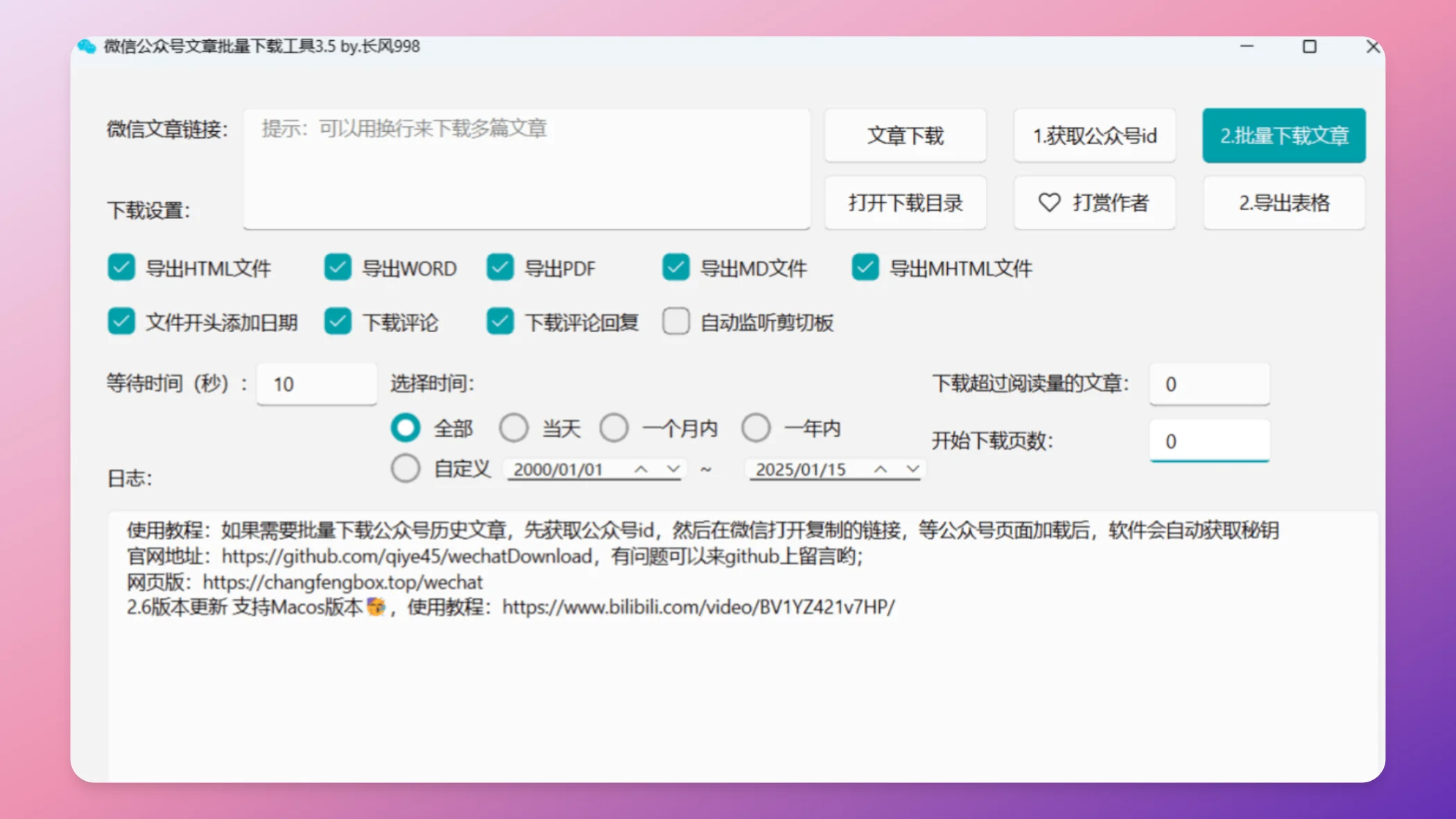
wechatDownload Features and Advantages
Compatibility: Runs on different operating systems to meet the needs of a wide range of users.
Multiple Formats: Downloaded articles can be saved as HTML, Markdown, PDF, or DOCX for easy reading and editing.
Images and Multimedia: Not only downloads article text but also saves images, videos, and audio files within the articles.
Open Source and Free: Open-sourced on GitHub, offered to users for free, with ongoing community maintenance and updates.
Command-Line Interface: Provides a command-line tool for advanced users, simplifying the download process and suitable for batch processing and automated tasks.
No Complex Setup Required: No need to install additional certificates. The operation is simple, making it easy even for non-technical beginners to get started.
How to Use wechatDownload
Downloading a Single Article:
Open any article in a WeChat Official Account and copy the article link.
Paste the link into the wechatDownload software and click "Download"; the article will be saved to the specified directory.
Batch Downloading Articles:
Similarly, copy an article link from the Official Account into the software.
Click "Get Official Account ID", and the software will prompt you to open a link via WeChat to obtain the key.
Send the link via the WeChat File Transfer Assistant or send it to a friend, then click it; the software will automatically acquire the permissions.
After completing the above steps, you can begin batch downloading articles from the specified Official Account.
In addition to downloading WeChat Official Account articles, wechatDownload also supports downloading videos, live replay recordings, and live streams from WeChat Channels (视频号). Users can enable the software's "Channel Monitoring" feature, then play a WeChat Channel video on the computer, and the software will automatically detect it and provide a download link. It supports both direct downloading and copying the link to download with other download software. Additionally, the new version also supports one-click downloading of articles from 360 Library, Toutiao, and NetEase News.
wechatDownload Download and Installation
Users can visit the GitHub releases page to download the installation packages for Windows and MacOS. After downloading, follow the prompts to install.
Related Links:
GitHub: https://github.com/qiye45/wechatDownload
Changfeng's Locker (长风的储物柜): https://changfengbox.top/wechat
XHS-Downloader: Xiaohongshu (Little Red Book) Link Extraction / Content Collection Tool









