
 Script Planner Assistant▸
 AI Apps
 AI News
GitHub Copilot Now Supports Agent Mode
小编 ·

GitHub Copilot Now Supports Agent Mode
GitHub Copilot has recently rolled out a major update called "Agent Mode," which enhances its AI-assisted development capabilities. When you assign it a task — such as fixing bugs or developing a new feature — you don't need to specifically point out the relevant code, as it will automatically find suitable solution code on GitHub. This mode enables GitHub Copilot to autonomously complete tasks, fix its own errors, and suggest terminal commands, thereby boosting development efficiency.
1. Agent Mode
Agent Mode allows GitHub Copilot to autonomously complete tasks, including automatically fixing errors and suggesting terminal commands. This mode enables Copilot to perform more complex operations while writing code, improving development efficiency. For example, Copilot can automatically identify and fix issues in code based on context, and even perform additional tasks such as running command-line instructions.
2. Copilot Edits
This update also officially introduces the Copilot Edits feature, which supports cross-file editing. This means developers can make changes across multiple files, and Copilot will provide intelligent suggestions to help users more easily adjust and refactor code.
3. Code Iteration and Error Fixing
In Agent Mode, Copilot can iterate on its own code, automatically identifying and fixing errors. This capability allows developers to focus more on high-level design and logic without worrying too much about low-level implementation details.
4. Terminal Command Suggestions
Agent Mode also supports terminal command suggestions, allowing developers to obtain relevant command hints directly within the code editor, further streamlining the development workflow.
6. Project Padawan
GitHub also unveiled for the first time a new autonomous software engineering (SWE) agent called Project Padawan. This agent will be able to directly handle tasks on GitHub — essentially a fully autonomous AI programmer. You just give it instructions, and it can independently complete tasks. This feature is set to reduce developers' daily workload, allowing them to focus on higher-value work.
In addition, GitHub has introduced other features in this update, such as smarter code completion and context-aware suggestions, to enhance the overall development experience. These updates not only strengthen GitHub Copilot's capabilities but also broaden and improve its application in developers' daily work.
How to Use Agent Mode?
To use GitHub Copilot's Agent Mode, you first need to download VS Code Insiders, then enable Agent in the GitHub Copilot Chat settings. In the Copilot Edits panel, switch the mode from Edit to Agent (right next to the model selector). Through this approach, developers can fully leverage Copilot's capabilities to boost development efficiency and code quality.
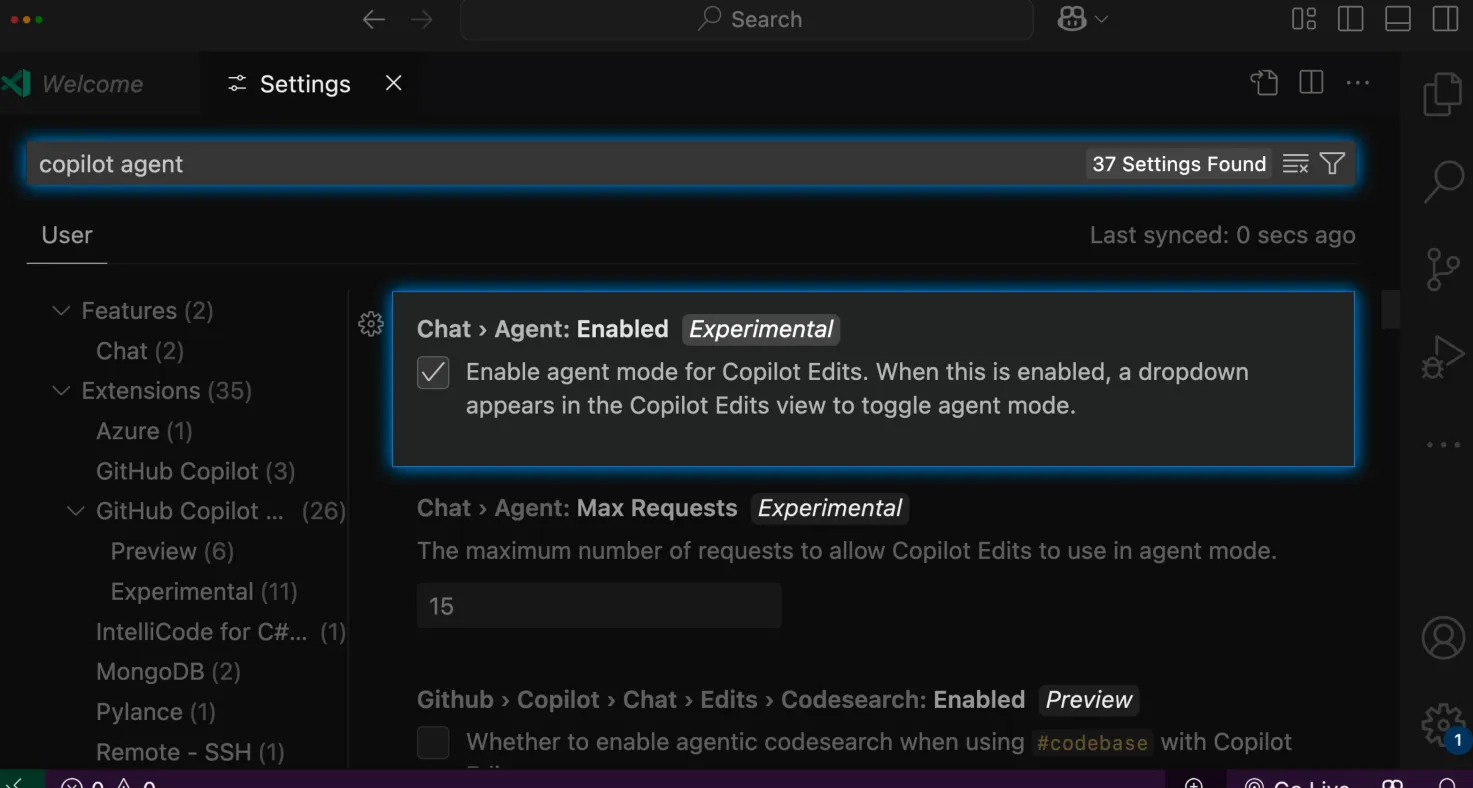
GitHub Copilot's Agent Mode, by enhancing autonomous capabilities and intelligent code processing, provides developers with a more efficient programming experience.
GitHub Copilo plans to continue improving the performance of Agent Mode and Copilot Edits over the next few months, including supporting the transition from Copilot Chat to Copilot Edits, maintaining context consistency, and suggesting files in the working set.
Details: https://github.blog/news-insights/product-news/github-copilot-the-agent-awakens/









