
 Script Planner Assistant▸
 AI Apps
 AI News
Voice-Pro: A Multilingual Audio Tool Combining Subtitles, Translation, and TTS
小编 ·

Voice-Pro: A Multilingual Audio Tool Combining Subtitles, Translation, and TTS
Voice-Pro is a multilingual audio processing tool that integrates subtitles, translation, and TTS, with one-click installation.
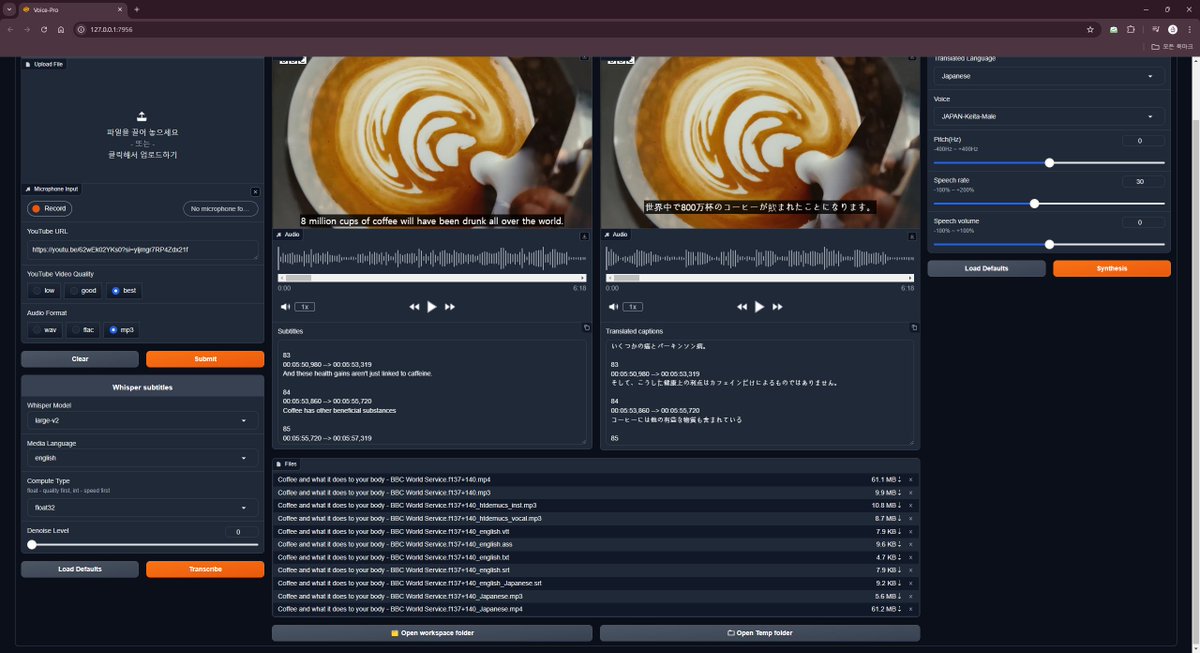
Voice-Pro supports real-time translation in over 90 languages, ideal for live streaming or instant translation scenarios.
Voice-Pro Main Features:
Studio Tab
Provides an integrated environment for YouTube downloader, noise reduction, subtitles, translation, and TTS
All video/audio formats supported by ffmpeg can be used
Selectable output audio formats (wav, flac, mp3)
Speech recognition and subtitle creation in 100 languages
Choose subtitle creation options suitable for your PC performance (Whisper model and computation type)
Translate into over 100 languages and generate speech via TTS
The original BGM and sound effects of the video are preserved in multilingual videos.
Supports TTS voice speed, volume, and pitch adjustment
Whisper Caption Tab
A tab dedicated to subtitle creation. Supports over 90 languages
Display subtitles created from videos
Provides world-class highlight features
Provides noise reduction functions (1-Demucs, 2-MDXNet)
Translate Tab
Dedicated translation tab. Supports over 100 languages
Supports subtitle files (ass, ssa, srt, mpl2, tmp, vtt, microdvd, json)
You can also enter text directly
Automatically detects the language of uploaded files
TTS Tab
TTS-only tab. Supports over 100 languages and 400 voices
Supports subtitle files (ass, ssa, srt, mpl2, tmp, vtt, microdvd, json)
You can also enter text directly
Automatically detects the language of uploaded files
Pitch, volume, and speed are adjustable
Live Translation Tab
Real-time speech recognition and translation support
Choose audio input source, such as microphone, speakers, etc.
Provides the function to save captured audio, recognized subtitles, and translated subtitles
Batch Tab
Batch process large volumes of files
Subtitles, translation, TTS
Voice-Pro Features:
You can download YouTube videos (mp4, webm) and save them as audio files (mp3, wav, flac).
You can improve speech recognition accuracy by eliminating noise and isolating vocals. Uses MDX-Net and Meta's Demucs.
Provides automatic subtitle creation, machine translation, and TTS features through AI speech recognition.
You can easily create multilingual videos.
One-click installation. Once installed, you can use it permanently at no additional cost. (※ The free version has a 30-minute usage time limit)
Provides Web-UI. Google Chrome browser is recommended.
Voice-Pro Project URL:https://github.com/abus-aikorea/voice-pro









