
 Script Planner Assistant▸
 AI Apps
 AI News
Figma Launches New Presentation Tool: Figma Slides
小编 ·

Figma Launches New Presentation Tool: Figma Slides
Figma has launched a new presentation creation tool called Figma Slides, which allows multiple users to collaborate on the same presentation in real time. Team members can edit, comment, and communicate simultaneously. It offers many ready-made professional templates that you can freely mix and match as needed to create new templates. With Figma Slides, design and prototyping in Figma Design are seamlessly integrated. Users can directly insert and showcase interactive prototypes within the presentation, and collect audience feedback in real time, making presentations more interactive and vivid.
Figma Slides' presentation mode supports presenter notes and real-time interaction. You can share the presentation link to let the audience engage without manually switching slides. The tool is currently in beta and is available to anyone with a Figma account.
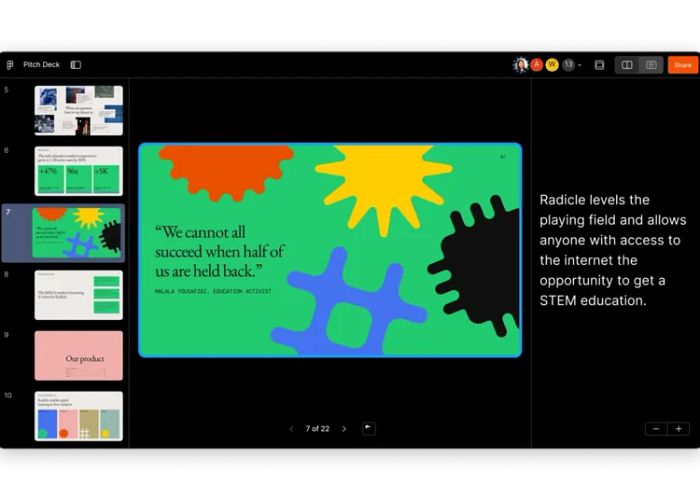
High-Fidelity Design Tools
Figma Slides provides all the tools that designers are familiar with, making presentation design more professional and efficient. This includes:
Support for presenter notes for easy reference during the presentation.
You can share the presentation link to allow audience interaction.
Support for multiple presenters to share focus without manually switching slides.
Speaker notes: help you remember key points during your presentation and improve your presentation skills.
Design Mode Switching
Designers can switch to Design mode at any time to use Figma's full design capabilities:
Auto Layout: easily adjust the arrangement and alignment of elements.
Advanced properties: allow you to fine-tune the details of every design element.
Grid View Editing
In Figma Slides, you can choose to edit in either single-page view or grid view:
Single-page view: focus on the details of each slide.
Grid view: see all slides at a glance, making it easier to adjust and optimize the narrative structure of your presentation.
Interactive Features of Figma Slides
Features that enhance team collaboration and feedback collection, including:
Voting: team members can vote on different options and make decisions quickly.
Consensus meter: used to indicate the level of support team members have for a particular solution.
Face stamp: members can stamp their own face on a slide to show they have read or agreed.
Embedded Prototypes and Animated Transitions
Showcase interactive prototypes directly within slides and use animated transitions:
Embedded prototypes: showcase your design prototype directly within the presentation without switching to another tool.
Animated transitions: use smart animate, push, and dissolve effects to make slide transitions more natural and engaging.
Co-Presentation Features
Support seamless switching between multiple presenters, avoiding the awkwardness of a single person controlling the slides:
Presenter switching: different team members can freely take over control during the presentation, improving interactivity and fluidity.
AI Assistance and Templates
Integrated AI features and a variety of templates to help you easily create and adjust presentations:
AI assistance: can help you adjust the tone of your text, translate content, and even shorten text.
Templates: a variety of pre-designed templates are available to choose from; you can select the right one and customize it according to your needs.
Template Mixing and Customization
Allow users to pick their favorite parts from multiple templates and unify the theme:
Template mixing: extract the best parts from different templates and combine them to create a unique presentation.
Custom themes: choose a unified theme to make your entire slide deck look more consistent and professional.
Detailed introduction: https://www.figma.com/blog/figma-slides/









