
 Script Planner Assistant▸
 AI Apps
 AI News
Getting Started with ByteDance Jianying Dreamina: Features & Tutorial

Getting Started with ByteDance Jianying Dreamina: Features & Tutorial
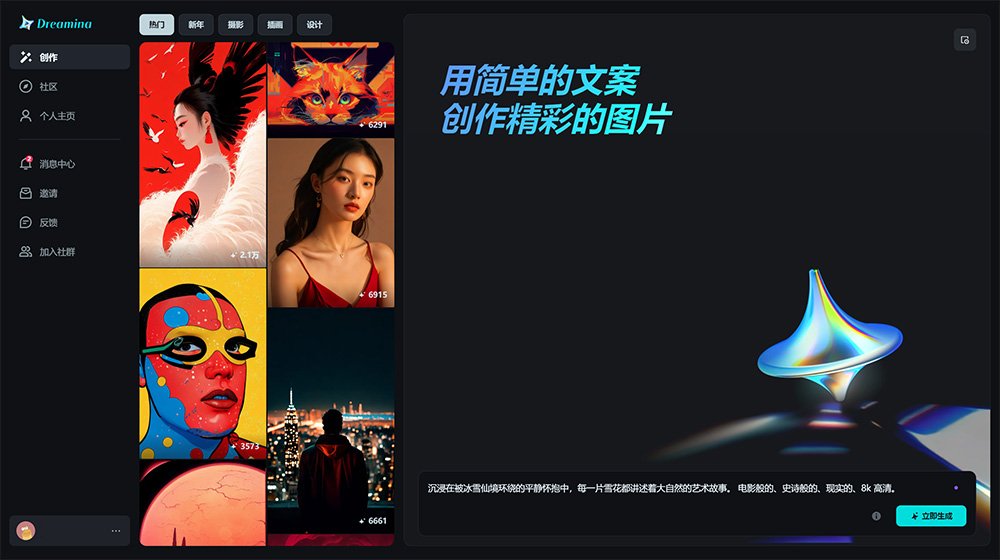
Dreamina is a text-to-image AI creation tool launched by ByteDance's CapCut platform. Dreamina's main features include text-to-image generation, image expansion, inpainting, and image inspiration generation, aiming to help users create creative images, graphics, and short videos through artificial intelligence technology. It is suitable not only for professional artists but also for amateurs, meeting the creative needs of different users.
In addition, Dreamina also provides a rich set of preset prompt templates, such as photography, realism, illustration, and design, allowing users to generate matching images with a single click.
Dreamina is currently in its beta testing phase, and users can apply for access through a specific application link.
Dreamina Beta Invitation Link: https://www.capcut.cn/s/iNWLuFKR/
Dreamina Main Features:
Text-to-creative-image generation: Dreamina can quickly generate corresponding scene images based on text descriptions input by users. Currently, it temporarily supports AI image generation in two scene styles: general and anime.
Image editing and template selection: Supports adjusting the size ratio and template type of generated images, as well as selecting parameters such as model, image size ratio, and image fineness.
Ultra-clear image processing: Capable of processing lower-resolution images into ultra-clear 4K and 8K images.
Image expansion and parameter adjustment: Supports expanding images by 1.5-3x, changing image ratios, and adjusting parameters such as model, image size ratio, and image fineness.
Supports importing reference images.
Video generation capability: According to a report on February 27, 2024, Dreamina is about to launch its text-to-video capability and is inviting creators who are interested in AI capabilities and have a certain creative foundation to participate in priority in the beta testing of the product launch.
Dreamina Usage Tutorial:
1. Open the Dreamina web official site and log in by scanning the QR code with the Douyin APP.
2. Enter the description of the desired image, keywords, or description in the input box. Dreamina supports multiple art forms, such as anime, realism, photography, and illustration, so you can choose the corresponding art style for description.
3. Click the "Generate Now" button, and Dreamina will generate 4 corresponding scene images based on your description.
4. You can perform re-editing and detail redrawing adjustments and optimizations on the generated creative images, including adjusting image size ratio, image fineness, and other parameters.
5. Save or download the work, with the option to download in high definition.
Looking at future development trends, Dreamina is designed as a creative platform specifically targeting Douyin users for image, graphic, and short video content creation. Its core goal is to significantly expand and enrich Douyin's resource library in the field of AI content creation through the application of AI technology. Dreamina is far more than a simple AI creation tool; it is actually a comprehensive content creation ecosystem that provides users with a powerful platform to quickly transform various creative ideas into visual images.









