
 Script Planner Assistant▸
 AI Apps
 AI News
Chrome Adds New Generative AI Features
小编 ·

Chrome Adds New Generative AI Features
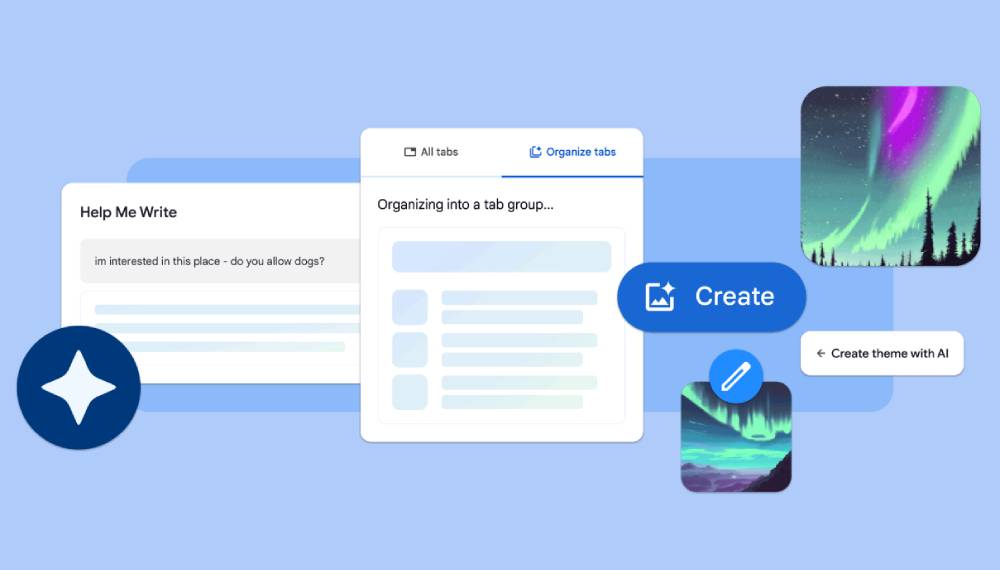
Google Chrome has just received a major update! It now includes a built-in AI writing assistant (free), here are 5 awesome new features:
1. AI Writing Assistant
This new feature will help you start writing or polish what you've already written on any site. Simply right-click on any text box or field on any website you visit in Chrome, then choose "Help me write," and the AI will kickstart the writing process for you. Currently available in the US and will expand soon.
2. Smart Tab Manager
Chrome will now automatically suggest and create tab groups based on the tabs you have open. Helpful for multitasking such as planning a trip, researching, and shopping.
3. AI Theme Creation
Now you can generate custom themes based on a topic, mood, visual style, and color of your choosing! To start, simply visit the "Customize Chrome" side panel, click "Change theme," and then choose "Create with AI."
4. Automatic Misspelling Correction
Chrome can now detect URLs with typos in the address bar and show you suggestions based on the websites you've visited before.
5. Smarter Autocomplete
In Chrome on desktop, autofill will now recommend sites based on any word you've previously searched for.
Throughout this year, Chrome will look for more ways to bring AI and ML into Chrome, including integrating Google's new AI model Gemini, making browsing easier and faster.









