
 Script Planner Assistant▸
 AI Apps
 AI News
ChatGPT Memory Feature Now Officially Available
小编 ·

ChatGPT Memory Feature Now Officially Available

In the early hours of February 14, Openai announced a major update to ChatGPT: the addition of memory features and new user control options.
ChatGPT can now remember all the information from your interactions across chats during your exchanges with users, and use this information in subsequent conversations to provide more relevant and personalized responses.Previously tested content involved ChatGPT being able to use the conversations between you to self-evolve and learn, but this time those features were not mentioned! It only stated that chat responses have been improved!
Key features of ChatGPT's memory function:
Memory feature: ChatGPT can remember things discussed by users across all chats, eliminating the need for users to frequently ask the same questions. ChatGPT will remember that content and make long conversations, personalized chats, etc., so that future conversations become more useful.
User control: Users can explicitly tell ChatGPT to remember certain content, ask it what it has remembered, tell it to forget certain information through conversation or settings, or even completely turn off the memory feature.
How it works: When users chat with ChatGPT, they can ask it to remember specific information or let it capture details on its own. ChatGPT's memory feature will improve with increased use, and users will gradually notice this improvement.
Privacy and security standards: The memory function brings additional privacy and security considerations. OpenAI has taken measures to evaluate and mitigate bias, and to prevent ChatGPT from proactively remembering sensitive information unless explicitly requested by the user.
Enterprise and team users: For enterprise and team users, the memory feature can assist when using ChatGPT for work, learning the user's style and preferences, and building on past interactions to save time and provide more relevant and insightful responses.
GPTswill also have memory: GPTs will have their own unique memory. Builders will have the option to enable the memory feature for their GPTs. Just like chats with users, memory will not be shared with builders, and this feature is available to some free and Plus users.
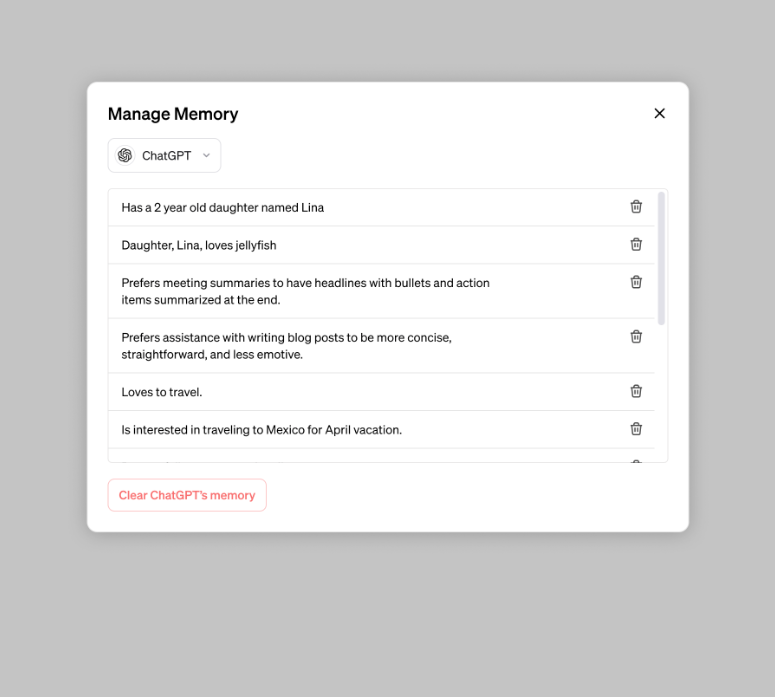
How to use ChatGPT's memory feature:
For example, if you want ChatGPT to remember that you live in the suburbs and therefore prefer driving directions over public transportation, you can simply tell it this fact (e.g., "Remember that I live in the suburbs and drive most of the time."). Or, if you want its parenting advice to be relevant to young children because you have a kindergartener, you can emphasize this to it (e.g., "Remember that I have a kindergartener"). ChatGPT's memory will get better the more you use it, and over time you'll begin to notice its improvements.
How to control ChatGPT's memory feature:
The new memory feature is powerful, but it also brings data security concerns. Therefore, the memory feature of ChatGPT and GPTs can be disabled at any time from the ChatGPT settings menu. When it is turned off, ChatGPT and GPTs will not create or use memory. How do you control it?
Turn off memory: Users can turn off this feature at any time via Settings > Personalization > Memory.
Delete memory: If you want ChatGPT to delete certain remembered content, go to Settings > Personalization > Manage Memory to delete specific content.
Temporary memory-free chat: If you don't want to use the memory storage feature when chatting with ChatGPT, you can use the temporary chat feature. (This feature is available to some free and Plus users)
It should be noted that deleting a chat from the chat history does not delete ChatGPT's or GPTs' memory. You need to delete the memory storage in order to completely remove the content.









