
 Script Planner Assistant▸
 AI Apps
 AI News
ReadMemo: Summaries Can Now Sync to flomo!

ReadMemo: Summaries Can Now Sync to flomo!
As a minimalist and practical reading summary tool, 纸片阅读 (ReadMemo) can quickly distill the core content of an article for you. Through one-sentence summaries, key point overviews, and keyword extraction, it becomes your most reliable reading assistant. In addition, "纸片阅读" can also identify ads hidden within articles, so those pervasive marketing copy will no longer interrupt your reading flow.
Based on the summary capabilities above, 小纸片 is bringing you brand new features—
Sync to flomo & Earn credits by inviting friends.
|Sync to flomo to organize your summaries and thoughts
Filtering and browsing information is only the starting point of acquiring new knowledge. Recording, managing, and outputting are indispensable steps in the process of information collection and reuse. The ultimate purpose of reading and gathering information is to expand your cognition and make decisions. Therefore, quickly incorporating useful information into your own knowledge base is an important part of information management.
Thus, based on users' needs to manage effective messages and build personal information libraries, we have launched the Sync to flomo feature.
flomo (浮墨笔记) is a card-based note-taking software that helps users capture ideas and inspirations in a timely manner. In flomo, users can manage notes according to their own needs, review them regularly, and build their own knowledge base.
With one-click sync to flomo, you can not only store useful information in your own knowledge base, but also record your thoughts at any time and periodically review them to gain new insights from the old.
To get started, you only need two steps: "Bind + Send a Command":
1. Bind
Go to the menu page of the "纸片阅读ReadMemo" WeChat official account, find "同步摘要" (Sync Summary) in the function section below and click "flomo"; click the message link to enter flomo, go to Settings in flomo to find your API and copy the API link; return to the official account and paste your API link to complete the binding. See the image below for the detailed operation flow:
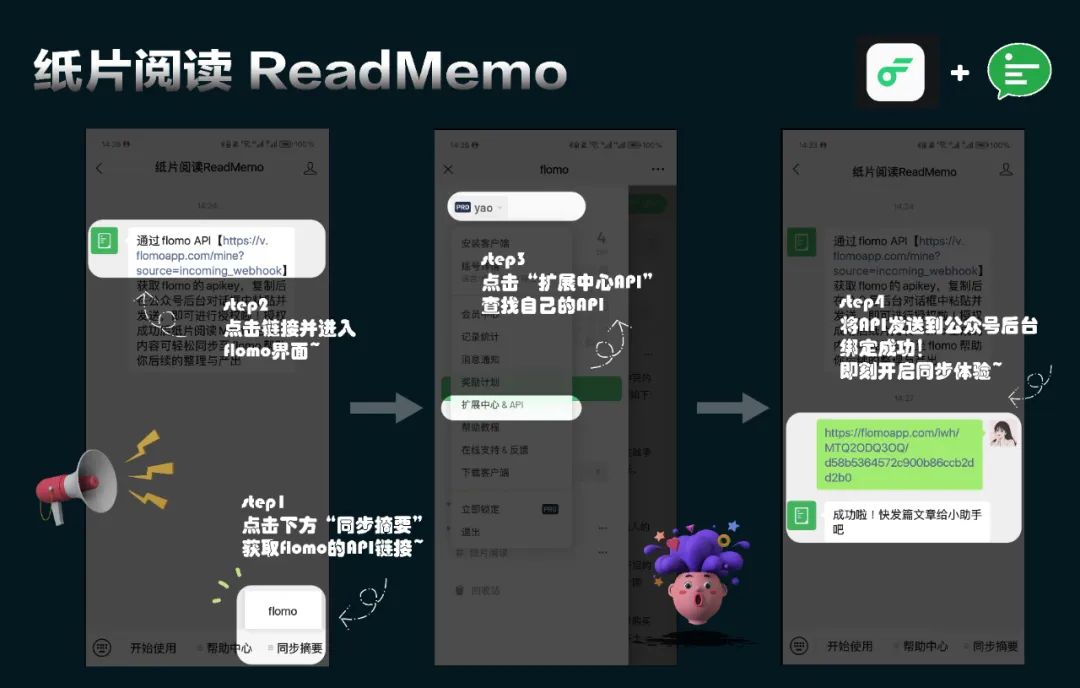
After that, you can start the quick sync experience in "纸片阅读助手"~
2. Send a Command
Enter the chat with "纸片阅读助手", send the article you want to summarize, and once the summary is generated, send the two characters 【收藏】 to export the most recent summary along with the original article link to flomo.
If you need to sync a previously generated summary, you can long-press that summary message or long-press the original article message, click "Quote" and send the 【收藏】 command to immediately sync it to flomo.
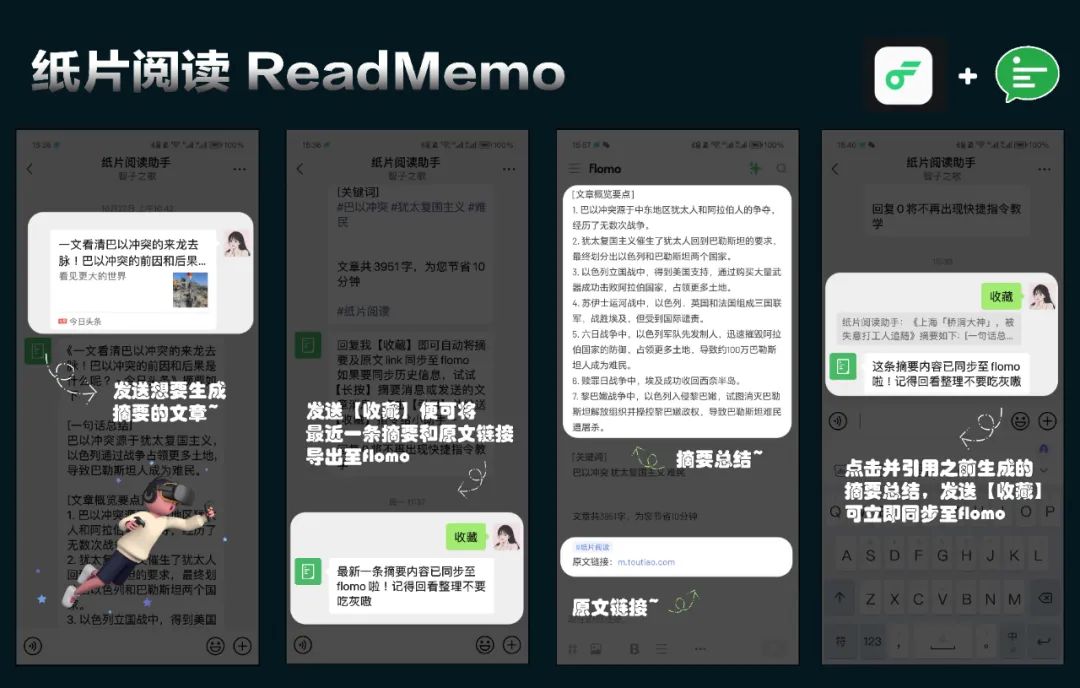
Flow for saving summaries/original articles
Sync Tips:
1) To use the sync feature, you need to subscribe to flomo Pro membership first.
2) If you also want to sync the article link, remember to save directly or quote the article message when saving afterwards.
3) When binding flomo and WeChat, remember to register and log in to flomo first.
4) All summaries synced to flomo will be tagged with #纸片阅读, so you can easily find them.









