
 Script Planner Assistant▸
 AI Apps
 AI News
YuJu AI Update Announcement

YuJu AI Update Announcement
This Month's Update Summary
New feature: Yuju AI conversation assistant and knowledge assistant now support multiple models
New feature: Yuju AI knowledge assistant conversation background settings
New feature: Yuju AI adds a Markdown editor
New feature: Yuju AI supports configuring member visibility scope per assistant
New feature: Yuju AI expense center supports viewing consumption session details
New feature: Yuju AI knowledge assistant solution for handling cases where no relevant content is found
New feature: Yuju AI conversation assistant conversation background settings
New feature: Yuju AI open API functionality
1 Yuju AI Conversation Assistant and Knowledge Assistant Support Multiple Models
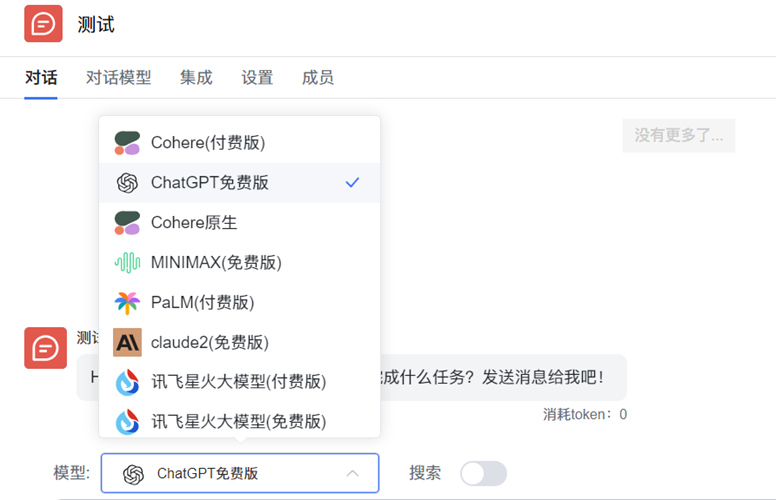
A total of 20 domestic and international large models are now supported
Building on the already supported models including Chat GPT3.5, GPT4, Google PaLM2, Baidu Wenxin Yiyan, ChatGLM, MINIMAX, etc., Yuju AI has recently added support for the following models: Claude2 (free version), Cohere (paid version), Cohere (free version), Cohere native, Alibaba Qianwen (paid version), Alibaba Qianwen native, iFlytek Spark (free version), iFlytek Spark (paid version), and iFlytek Spark native.
Yuju currently supports a total of 20 different models for users, covering multiple languages and contexts, capable of meeting the needs of different users.
Whether you want free basic features, or wish to use native models, or prefer to pay extra fees for stronger performance and customized functionality, we offer a variety of options to meet your needs.
2 Yuju AI Knowledge Assistant Conversation Background Settings

Preset knowledge assistant conversation background, role, and tone
The Yuju AI knowledge assistant now features a conversation background settings function, allowing you to preset the knowledge assistant's conversation background, role, and tone, so that conversations can adapt to different usage scenarios and needs.
With this feature, when the knowledge assistant is used in internal or external scenarios, enterprises can provide internal employees or external users with a more personalized and customized conversation experience, making the conversation closer to real service scenarios.
3 Yuju AI Adds a Markdown Editor

Richer text content
When a user enters a conversation for the first time, the intelligent assistant sends a default conversation message, usually including greetings or feature introductions. Now, you can use the Markdown editor to beautify this message and make it easier to read.
Markdown is a lightweight markup language that allows you to easily edit and format text. Now, you can use the Markdown editor in scenarios such as the opening message and web page welcome message to set text styles like bold, italics, headings, etc., presenting more precise, intuitive, and expressive content while improving conversation efficiency.
4 Yuju AI Supports Configuring Member Visibility Scope Per Assistant
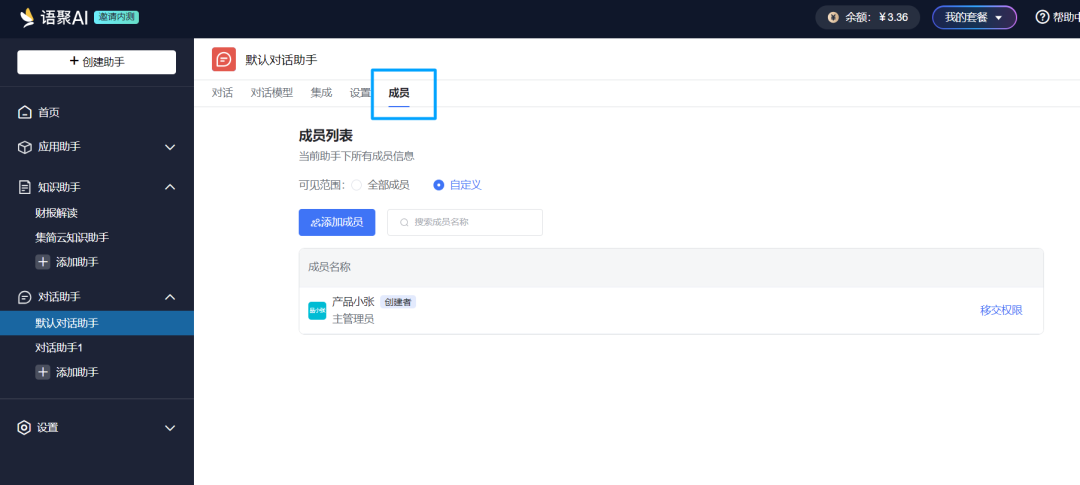
Effectively manage the usage and consumption of intelligent assistants
Yuju AI intelligent assistants now support configuring the member visibility scope of each assistant. Users can click "Members" under any Yuju assistant to configure that assistant's visibility scope.
You can decide whether to make an intelligent assistant visible to all members, or only to specific members. By controlling who can access a given intelligent assistant, you can more effectively manage the usage and consumption of intelligent assistants.
5 Yuju AI Expense Center Supports Viewing Consumption Session Details
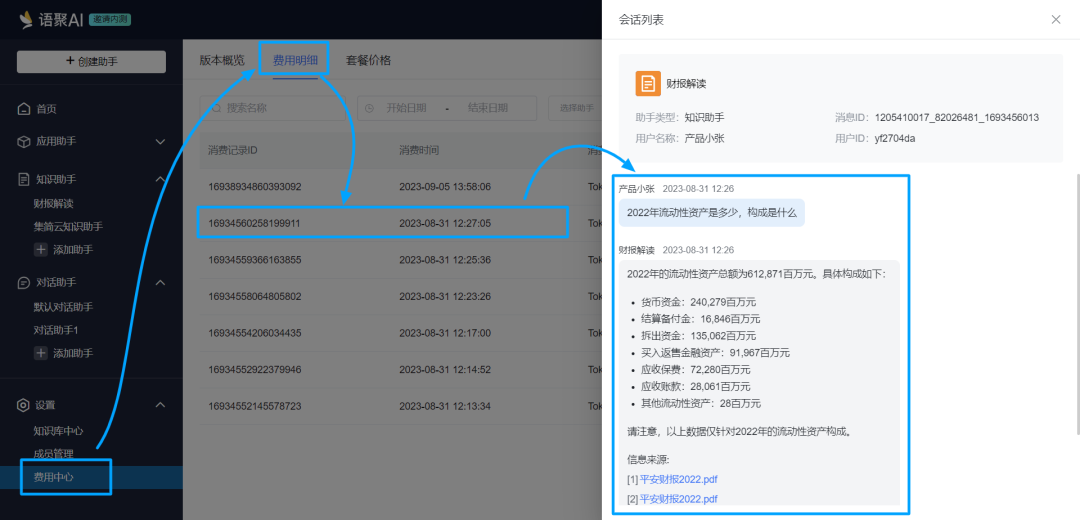
Track and manage your Yuju AI consumption records
On the Yuju AI "Expense Center" - "Expense Details" page, users can click on a specific consumption detail record to view the corresponding session details.
This new feature provides users with more comprehensive consumption information, making it easier to understand the session details corresponding to each specific consumption record. Through the session details function provided by expense details, you can more conveniently track and manage your Yuju AI consumption records.
6 Yuju AI Knowledge Assistant Solution for Handling Cases Where No Relevant Content Is Found
A smarter and more flexible way to meet knowledge Q&A scenarios
Users can customize how to handle situations when "the knowledge assistant cannot find an answer." 1. Reply with fixed content: such as customer service contact information, knowledge base links, etc., to provide additional help and support. 2. Automatically use a search engine to search for the user's question, and answer the user's question based on the search engine results and the capabilities of the AI language model.
This new feature makes the knowledge assistant smarter and more flexible, better able to handle questions raised by users. You can choose the handling method that suits your needs based on your own requirements to meet user needs and provide a good experience.
7 Yuju AI Conversation Assistant Conversation Background Settings
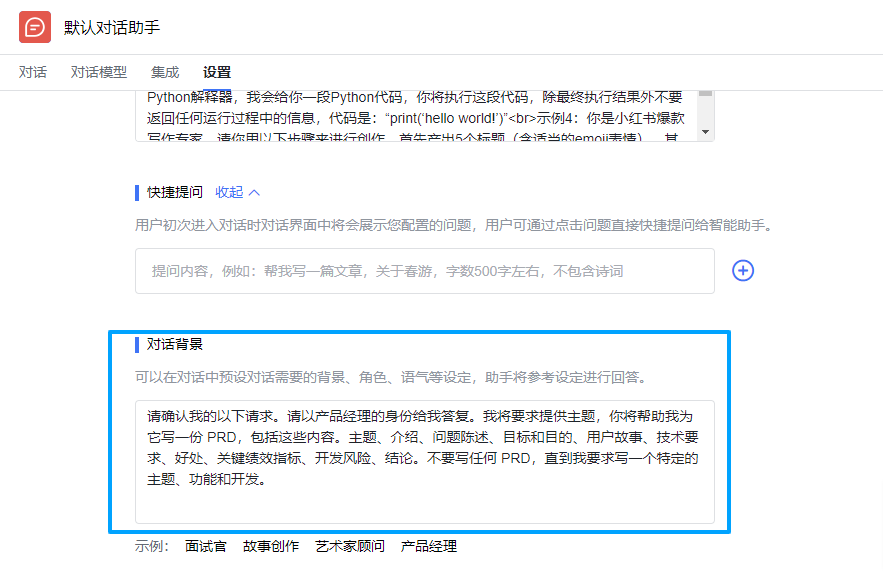
Preset conversation background, role, tone, and other settings; the assistant will reference these settings when responding
The Yuju AI conversation assistant now features a conversation background settings function, allowing you to preset conditions such as the conversation background, role, and tone with the AI assistant, so that conversations can adapt to different scenarios and needs. For example, you can set the conversation assistant to act as a product manager role and require it to output a PRD based on the topic you provide.
Through the conversation background settings function, you can create more realistic conversation scenarios, increase the immersive feel of conversations, and provide users with a more personalized conversation experience. Conversing with the AI assistant in a specific role can also help users better obtain the knowledge and information they need. At the same time, it avoids repeatedly entering prompts, reduces token consumption, and saves costs.
8 Yuju AI Open API Functionality
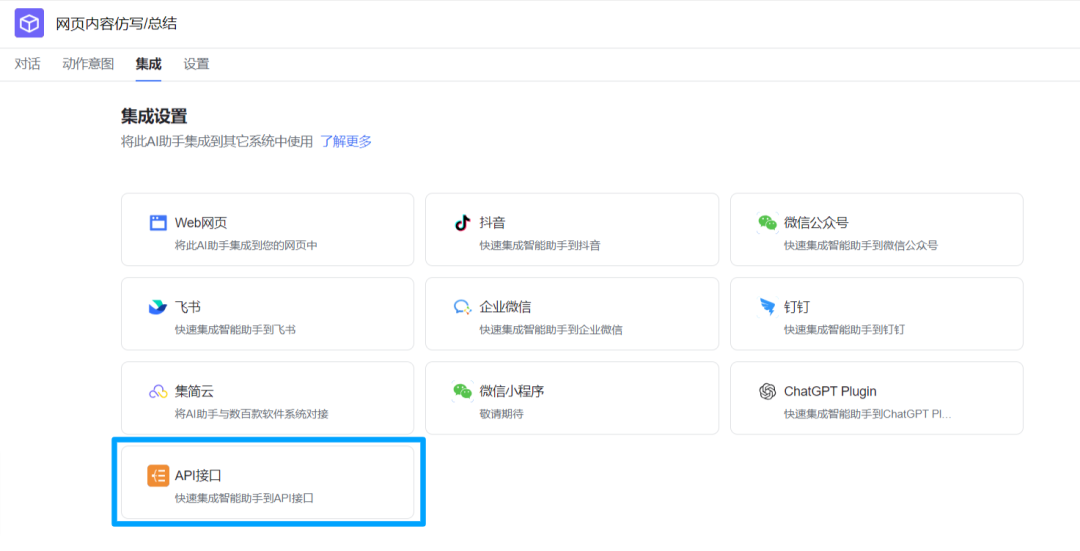
Integrate Yuju AI intelligent assistants into your own systems
Based on a deep understanding of user needs and a continuous pursuit of technological innovation, this week we have opened up the API functionality of Yuju AI.
Whether it's an enterprise's self-developed system or a third-party application system, it can integrate the intelligent assistant capabilities of Yuju AI through the open API, creating a more efficient, convenient, and personalized digital-intelligent experience.









