
 Script Planner Assistant▸
 AI Apps
 AI News
StartAI: The Ultimate PS Plugin Every Designer Needs!

StartAI: The Ultimate PS Plugin Every Designer Needs!
As a designer, nothing is more frustrating than a lack of inspiration, and searching for creative materials or reference images always takes up a huge chunk of work time. However, ever since I discovered START ai, this PS plugin, my work troubles have drastically diminished. Many tedious and dull tasks have been completely handled by START AI, allowing me to rediscover the joy of simply focusing on design.
The core functionality offered by START AI is its AI features, which include: Text to Image, Generate Similar Image, Inpainting, Line Art Coloring, and Lossless Upscaling. These features can handle the most tedious parts of design work, so next I'll walk you through how to use them!
Since START AI is a PS plugin, it works based on Photoshop, so its prerequisite is: Adobe Photoshop must be installed and running Photoshop CC 2015 (version 8.0) or above.
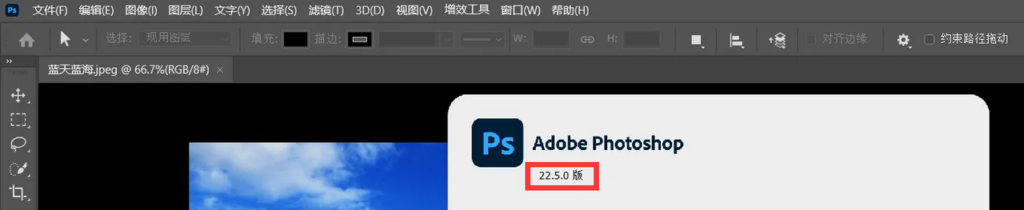
Downloading START AI is very straightforward. Once the prerequisites are met, go to the official 「StartAI」 website, register an account and log in. After logging in, you can download the installation package with a single click.
After the installation package is downloaded, it's time to install the plugin. The installation steps are not complicated. First, close any currently open Adobe Photoshop, then open the folder where the downloaded installation package is located, double-click the exe file, and follow the steps to complete the installation. Once done, you can start using it.

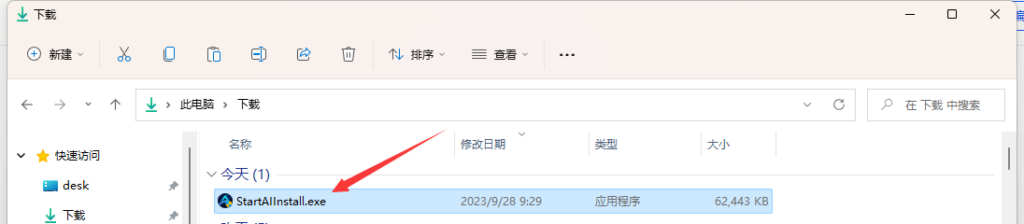
(StertAI provides a one-click installation package, no additional configuration required);
Finally, let's talk about how to use START AI. Just like the download and installation process, it's also a plug-and-play operation.
Once installed, the StartAI PS plugin will automatically launch when you open Adobe Photoshop. You can move or dock its panel anywhere you like, and then start using the StartAI PS plugin;
If you close the StartAI PS plugin and want to reopen it within Photoshop, simply go to Help > About Plug-ins from the top menu bar in Photoshop, where you'll see the StartAI PS plugin listed. Click on it to open and use it.
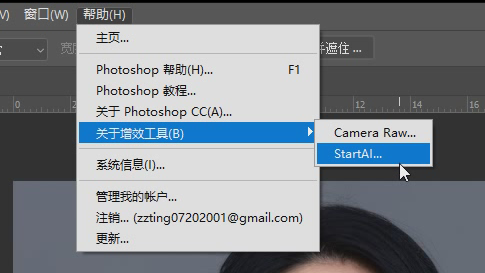
That's a brief introduction to START AI. Hopefully this helps everyone get started with START AI easily and reduce your workload~









